Table of Contents >> Show >> Hide
- The Fast Answer
- Can You See Who Viewed Your Snapchat Story?
- How to Check Who Viewed Your Snapchat Story
- What the Viewer List Really Tells You
- My Story vs. Public Story vs. Private Story
- How to Change Who Can See Your Snapchat Story
- What Snapchat+ Adds
- Why Your Snapchat Story Viewer List Might Not Look Right
- Do Third-Party Apps Show Hidden Snapchat Story Viewers?
- Best Practices for Checking Story Views Without Overthinking Them
- Frequently Asked Questions
- Real-World Experiences With Snapchat Story Views
- Final Thoughts
If you have ever posted a Snapchat Story and then immediately turned into a tiny digital detective, staring at your phone like it owes you answers, you are not alone. One of the most common questions Snapchat users ask is simple: How do you see who viewed your Snapchat Story? The good news is that Snapchat does let you check who viewed your Story. The less-fun news is that it is not a secret x-ray machine for your entire social circle.
In other words, you can see who viewed your own Snapchat Story, but you cannot see a hidden list of people lurking on someone else’s Story, and you cannot unlock anonymous “stalker” reports with some magical trick. If an app promises that, it is waving more red flags than a referee at a very dramatic soccer game.
This guide walks through the exact steps, explains what the viewer list really means, covers the difference between My Story, Public Story, and Private Story, and shows how Snapchat+ fits into the picture. By the end, you will know how to check your Snapchat Story views without falling for myths, scams, or weird internet nonsense.
The Fast Answer
If you want the quick version, here it is:
- Open Snapchat.
- Go to your profile.
- Tap My Story.
- Swipe up on the Story snap.
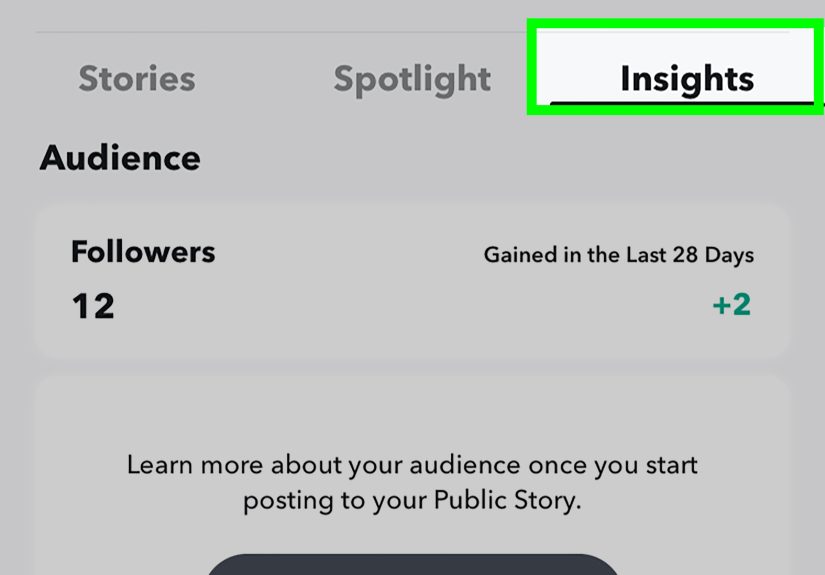
That opens your Snapchat Story viewer list, where you can see who watched it. If someone took a screenshot, Snapchat can show that too. For a Public Story, you open the public Story snap and swipe up to see Insights and Replies.
Can You See Who Viewed Your Snapchat Story?
Yes, but with an important asterisk: Snapchat lets you see who viewed your Story, not who viewed somebody else’s. That sounds obvious, but plenty of people still search for ways to see “secret viewers,” “anonymous viewers,” or “who stalked my Snapchat.” That is where the internet starts acting like a late-night infomercial.
Snapchat’s built-in viewer tools are meant for content you posted. So if you shared a Story about your lunch, your dog, your gym selfie, or your suspiciously artistic iced coffee, you can check who watched it while the Story is active. If you did not post it, you do not get the guest list.
That is also why third-party apps claiming to reveal hidden Story viewers are a bad bet. At best, they are useless. At worst, they are phishing traps dressed up like “premium analytics.”
How to Check Who Viewed Your Snapchat Story
For My Story
If you posted to My Story, the steps are straightforward:
- Open Snapchat and tap your profile icon.
- Find My Story on your profile page.
- Tap the Story to open it.
- Swipe up on the snap you want to inspect.
You should then see the viewer list for that Story snap. Snapchat also shows whether anyone took a screenshot. That can be handy if you posted something casual and suddenly feel like it deserves witness protection.
There is one detail many users miss: Snapchat shows the names of up to 200 viewers. After that, it may show the total number of views without giving you an endless scroll of names. So if your Story suddenly takes off, do not panic when the list stops behaving like a roll call.
For a Public Story
If you posted publicly, the process is a little different. Open your public Story snap and swipe up to access Insights and Replies. There, Snapchat can show your viewers and other performance data, such as views, screenshots, and engagement signals.
This setup is more useful for creators, businesses, or anyone trying to figure out whether their content is landing well. If My Story is like checking who came to your backyard barbecue, Public Story insights are more like reviewing ticket sales, applause, and who stayed for the encore.
What the Viewer List Really Tells You
Seeing Story views on Snapchat is useful, but it helps to understand what you are actually looking at.
It shows who watched the Story
The main feature is simple: you get to see which accounts viewed the Story you posted. That is the heart of the Snapchat Story viewer list.
It can show screenshots
If someone screenshots your Story, Snapchat can flag that. This matters because “temporary” content is still very screenshot-able. The internet has never met a moment it could not preserve forever.
It does not show who viewed your profile
Snapchat does not provide a standard feature that tells you everyone who tapped into your profile just to snoop around. So if you are hoping to catch profile visitors the way some other platforms make people think they can, that is not really how Snapchat works.
It does not expose secret anonymous viewers
If you are asking whether Snapchat secretly records mystery lurkers and lets you unlock them through hacks, the answer is no. The app shows the viewer tools it officially supports. Anything beyond that is usually rumor, confusion, or somebody trying to sell you nonsense with extra glitter.
My Story vs. Public Story vs. Private Story
One reason people get confused about Snapchat Story views is that not all Stories work the same way. Here is the easiest way to think about it.
My Story
This is the regular Story most users mean. Depending on your privacy settings, it is visible to your friends or a custom audience. You can tap it from your profile and swipe up to see viewers.
Public Story
This is the broader version. A public Story can be visible to friends, followers, and a wider Snapchat audience, depending on how you post it. To check viewers, you use the public Story snap’s Insights and Replies area.
Private Story
A Private Story is for a selected group of people. It is more controlled, but it is not magical. The people who can view it can still screenshot or screen record it, so “private” should mean “limited audience,” not “immune from drama.”
If you want tighter control over who sees your content, Private Story is often the smartest choice. It is especially useful if you want to share life updates with close friends without broadcasting them to your entire friend list.
How to Change Who Can See Your Snapchat Story
If your bigger concern is not just who viewed your Story but who can view it in the first place, Snapchat gives you story privacy controls.
- Open your profile.
- Tap the settings gear.
- Go to My Privacy & Data.
- Under Who Can See, tap View My Story.
- Choose My Friends or Custom.
This is one of the best Snapchat privacy settings to review, especially if you post often. Keep in mind that changing the setting affects future visibility choices, but the privacy setting attached to an already-posted snap remains tied to how it was posted at the time.
That means if you posted a Story when your audience was wider, changing the setting later does not retroactively slam the door shut on that already-live snap.
What Snapchat+ Adds
If you subscribe to Snapchat+, you get some extra Story-related features. These do not turn you into a digital spy, but they do add more context.
Story View Notifications
You can choose specific friends and get a notification the first time they view a Story you post. This is useful if you are waiting for one person in particular to see something. You know, for purely casual reasons. Totally chill. Absolutely not emotionally loaded.
Story Timestamps
Snapchat+ can show what time your friends viewed your Story. That is extra detail, not extra power, but for curious minds it scratches a very specific itch.
Rewatch Indicator
This is the famous eyes emoji feature. It shows how many friends rewatched your Story. What it does not do is tell you exactly which friends rewatched it or how many total times they replayed it. So yes, Snapchat can hint that your Story had a second round of attention. No, it does not hand you a notarized list of repeat customers.
Why Your Snapchat Story Viewer List Might Not Look Right
Sometimes users think Snapchat is glitching when it is really just behaving normally. Here are a few common reasons the viewer list may seem confusing.
Your Story expired
Standard Stories are temporary. If the Story has expired, your access to viewer data may be limited compared with when it was still active.
You are checking the wrong Story type
My Story and Public Story do not use exactly the same viewing flow. If you are looking for Public Story metrics in the regular My Story area, things will feel off.
You expected more than 200 names
If your Story went beyond 200 viewers, Snapchat may stop showing additional names and show a number instead. That is not a bug. It is just how the feature works.
You are chasing a myth
A lot of online confusion comes from people expecting Snapchat to show profile viewers, anonymous viewers, or hidden rewatch identities. Those are not normal built-in features.
Do Third-Party Apps Show Hidden Snapchat Story Viewers?
No trustworthy method exists for using a random outside app to reveal secret Snapchat Story viewers. If anything, those apps are more likely to create a problem than solve one.
Some fake apps mimic legitimate tools, ask for your login, and then try to steal credentials or personal information. Others push spam, fake promises, or malware-style behavior. If an app says it can show anonymous viewers, secret stalkers, or “full Snapchat tracking analytics” far beyond what the platform offers, step away from it like it just coughed in your soup.
The safest rule is boring but effective: if Snapchat does not offer the feature inside Snapchat, do not trust some mystery app that claims it does.
Best Practices for Checking Story Views Without Overthinking Them
Yes, it is fun to check who viewed your Snapchat Story. No, it should probably not become a full-time emotional occupation. A few healthy habits help:
- Use viewer lists for context, not mind-reading.
- Adjust privacy settings before posting something sensitive.
- Use Private Stories for smaller circles.
- Avoid posting anything you would regret if screenshotted.
- Do not hand your login to third-party “viewer tools.”
The viewer list can tell you who watched. It cannot tell you why they watched, what they thought, whether they laughed, whether they judged your lunch order, or whether they accidentally tapped through while half asleep.
Frequently Asked Questions
Can you see who viewed your Snapchat Story more than once?
Not in a fully detailed way. Snapchat+ includes a Rewatch Indicator that shows how many friends rewatched a Story, but it does not identify the specific friends who rewatched it or how many times each person replayed it.
Can you see who viewed your Snapchat Story after 24 hours?
Viewer access is tied closely to the Story’s active life and the way Snapchat stores Story-related data. In practical everyday use, you should assume the easiest time to check viewers is while the Story is still live.
Can you see viewers on a Private Story?
Yes, you can still check who viewed content you posted to a Private Story. But remember that private does not mean impossible to capture. Viewers can still screenshot or record what they see.
Can you see who viewed someone else’s Snapchat Story?
No. Snapchat lets you see viewer information for Stories you posted, not for someone else’s Story.
Does Snapchat tell you who looked at your profile?
Not as a normal built-in feature for regular users. Story views and profile curiosity are two different things.
Real-World Experiences With Snapchat Story Views
Checking who viewed your Snapchat Story sounds like a tiny feature, but in real life, people use it for all sorts of reasons. Sometimes it is simple curiosity. Sometimes it is social strategy. Sometimes it is basically emotional archaeology with a Wi-Fi connection.
A common experience is posting something completely casual, like a coffee run, a concert clip, or your dog doing something dramatic for no reason, and then checking the viewer list to see who actually pays attention to your day-to-day life. That is often when people realize Snapchat Story views feel more personal than likes on some other platforms. A Story view can feel like a quiet “I saw that” without anyone having to type a reply.
Another very normal experience is noticing that certain people always show up. Maybe it is your best friend, a sibling, an ex, a crush, or that one person from high school who appears to survive entirely on iced coffee and curiosity. This is where many users start reading too much into the viewer list. Did they watch right away because they care? Did they rewatch because they were interested? Or were they just tapping through Stories while standing in line for tacos? Snapchat usually gives you data, not motive. That distinction saves a lot of unnecessary spiraling.
People also use Story views for practical reasons. Small creators and side-hustle owners often check who viewed a public Story to see whether product teasers, behind-the-scenes clips, or quick updates are getting traction. A creator may notice that one type of Story gets more replies, while another gets more screenshots or stronger engagement. Over time, that can help shape what they post next. In that context, learning how to see who viewed your Snapchat Story is less about vanity and more about understanding audience behavior.
Then there is the privacy side of the experience. Plenty of users discover the value of Story settings only after posting something to a wider audience than intended. That moment tends to arrive with a cold wave of realization and a sentence like, “Wait… why did that person see this?” Once that happens, users usually become much more interested in Custom Stories, Private Stories, and tighter audience controls. It is the social media version of learning to lock your front door after you realize you left it wide open all afternoon.
Some people also learn the hard way that temporary content can still become permanent if somebody screenshots it. Snapchat’s viewer tools can help you notice that, but the bigger lesson is simple: post with the assumption that anything funny, emotional, messy, or overly specific could survive longer than you planned. That does not mean you should never be spontaneous. It just means spontaneity works best with a tiny pinch of common sense.
In the end, the most useful experience-based takeaway is this: checking Snapchat Story viewers is helpful when you use it as information, not emotional prophecy. It can show you who watched, help you refine what you share, and remind you to manage your privacy settings. That is powerful enough without turning the whole thing into a detective thriller starring your front camera.
Final Thoughts
If you want to see who viewed your Snapchat Story, Snapchat already gives you the tools you need. Open your Story, swipe up, and review the viewer list. For a Public Story, use Insights and Replies. If you want more detail, Snapchat+ adds extras like Story View Notifications, Story Timestamps, and the Rewatch Indicator.
The bigger lesson is to use those tools wisely. Check your audience settings before you post, be careful with anything personal, and ignore third-party apps promising hidden viewer superpowers. On Snapchat, the safest path is usually the official one. Less mystery, fewer scams, and dramatically better odds of keeping your account out of trouble.