Table of Contents >> Show >> Hide
- First: The “Can I Just Download It from YouTube?” Reality Check
- Legal Ways to Use Music You Found on YouTube (Without the Sketchy Stuff)
- 1) Buy and download the song from a legitimate music store
- 2) Buy directly from the artist (the “support the humans” option)
- 3) Use music that’s actually licensed for reuse (Creative Commons / royalty-free)
- 4) Use YouTube Music Premium for listeningbut know its limits
- 5) If you already own the music elsewhere, use that source
- Before You Burn: Decide What Kind of Disc You’re Making
- How to Make the Mix CD: Step-by-Step (Windows and Mac)
- Make It Look and Feel Like a Real Mix CD
- FAQ: What People Usually Ask (and What Actually Works)
- Bottom Line: YouTube Is the Discovery ToolNot the Download Folder
- Real-World Experiences: What Making a YouTube-Inspired Mix CD Is Actually Like (500+ Words)
- SEO Tags
Mix CDs are the denim jackets of music sharing: not always practical, occasionally embarrassing, and somehow still cool. If you’ve got a laptop, a stack of blank CD-Rs, and a dangerously emotional playlist idea, you’re halfway there. The tricky part is this: a lot of people discover songs on YouTube and immediately wonder, “How do I get this onto a CD?”
Here’s the honest, internet-grown-up answer: you generally can’t legally pull audio files from YouTube just because you can hear them streaming. But you absolutely can make a mix CD using music you discovered on YouTubeby getting the tracks through legal, legit routes. This guide walks you through the smart ways to do it, plus the “why won’t my car stereo read this?” realities nobody warns you about.
First: The “Can I Just Download It from YouTube?” Reality Check
YouTube is a streaming platform. Most music on YouTube is copyrighted and licensed for streaming, not for saving as an audio file you can burn to a CD. Using “YouTube-to-audio” ripping tools is typically a violation of YouTube’s terms and can also cross into copyright infringement territory. In plain English: it’s the digital equivalent of walking out of a store with a candy bar while yelling, “I’M JUST BORROWING IT.”
So what’s allowed?
- Listening on YouTube (streaming) as intended.
- Downloading music you have rights to (your own recordings, public domain, or properly licensed tracks).
- Buying tracks from legitimate stores or directly from artists and then burning those files to a CD for personal use (depending on your local laws).
Good news: you can still build the same exact vibe of a YouTube-discovered playlistjust with files you’re allowed to use.
Legal Ways to Use Music You Found on YouTube (Without the Sketchy Stuff)
Think of YouTube as your music radar, not your music warehouse. Once you find a track you love, use one of these legitimate routes to get an audio file you can burn.
1) Buy and download the song from a legitimate music store
This is the cleanest path: you pay, you download, you burn. Plenty of U.S.-based platforms sell digital music files (often MP3, AAC, or sometimes lossless formats). Once you have a real file, you can create an audio CD in standard burning software.
Pro tip: If your goal is an old-school car stereo CD, an MP3 download works great. If your goal is “this is my forever archival masterpiece,” you might prefer higher-quality formatsthough audio CDs will convert everything to CD audio anyway.
2) Buy directly from the artist (the “support the humans” option)
Many artists sell downloads directly on their own websites or storefronts (often with bonus tracks, liner notes, or that one remix that mysteriously never shows up on streaming). If the YouTube upload is from the artist, the description often points to their official store, album page, or mailing list.
Why it’s great: You get a legitimate file and help the artist keep making music instead of living off instant ramen and hope.
3) Use music that’s actually licensed for reuse (Creative Commons / royalty-free)
Some YouTube creators upload music specifically meant to be reusedlike background tracks, lo-fi beats, or soundscapes. If it’s clearly labeled as Creative Commons or includes licensing terms that allow copying and distribution, you may be able to use itas long as you follow the license (like giving credit, not using it commercially, or sharing under the same terms).
How to do this safely
- Look for explicit licensing info in the video description or channel “About” section.
- Confirm the license type (for example, whether it allows redistribution).
- When in doubt, don’t assumeask the creator or pick a track with clear permissions.
Examples of legit sources: Creative Commons catalogs, public domain archives, and reputable U.S.-based libraries and archives that host reusable audio.
4) Use YouTube Music Premium for listeningbut know its limits
YouTube Music Premium can allow offline listening within the app, which is great for travel or spotty Wi-Fi. But offline downloads are typically not provided as standard audio files you can export and burn to a CD. It’s a listening convenience featurenot a “make your own CD factory” button.
5) If you already own the music elsewhere, use that source
Sometimes YouTube is just where you rediscover a song you already own on CD or purchased digitally years ago (maybe in a folder called “music new new FINAL (2).”). If you own a CD, you can rip it to your computer using mainstream music software and then compile a mix CD from those ripped tracks.
Important: This is generally considered personal use in many places, but laws vary. Sharing copies or distributing them is where you get into trouble fast.
Before You Burn: Decide What Kind of Disc You’re Making
This is where mix CDs go to either succeed gloriously or fail like a microwave trying to toast bread.
Audio CD vs. Data CD (MP3 CD)
- Audio CD: Plays in most CD players (car stereos, boomboxes, older home systems). Limited to about 74–80 minutes of music. Converts your files into the CD audio format.
- Data CD (MP3 CD): Stores MP3 files like a flash drive. Holds way more music, but only plays on CD players that support MP3/data discs.
If you’re gifting it or using an older car stereo, Audio CD is usually the safest choice.
Check your total runtime
A classic blank CD-R usually fits about 80 minutes of audio. That’s not “80 minutes if you believe in yourself.” It’s 80 minutes, period. If your playlist is longer, you’ll need to cut tracks, create a second disc, or switch to a data disc (if your player supports it).
Fix volume differences (so Track 4 doesn’t jump-scare you)
Mix CDs are famous for one thing: volume chaos. One song whispers, the next one screams like it stubbed its toe. Many music apps and editors can normalize volume or apply “sound check” leveling when creating a burn playlist. Don’t overdo processingjust aim for a consistent listening experience.
How to Make the Mix CD: Step-by-Step (Windows and Mac)
You don’t need fancy equipment. You need: (1) a computer with a CD burner (internal or USB external), (2) blank CD-Rs, and (3) audio files you’re allowed to use.
Step 1: Gather your audio files (legit sources only)
- Downloaded purchases (MP3/AAC/FLAC, etc.)
- Ripped tracks from CDs you own
- Licensed Creative Commons / public domain files
- Your own recordings
Step 2: Create a “burn list” playlist
Put the tracks in the exact order you want. Mix CDs are basically emotional storytelling with track numbers. Start strong, build the vibe, and place the “cry in the shower” song where it will do maximum damage (tastefully, of course).
Step 3: Choose your burning method
On Windows (common options)
- Built-in disc burning: Useful for data discs and basic burning tasks.
- Music apps / media players: Many include “Burn Audio CD” features depending on your setup.
- Dedicated CD burning software: Often offers better control (audio CD mode, gaps, CD-Text, verification).
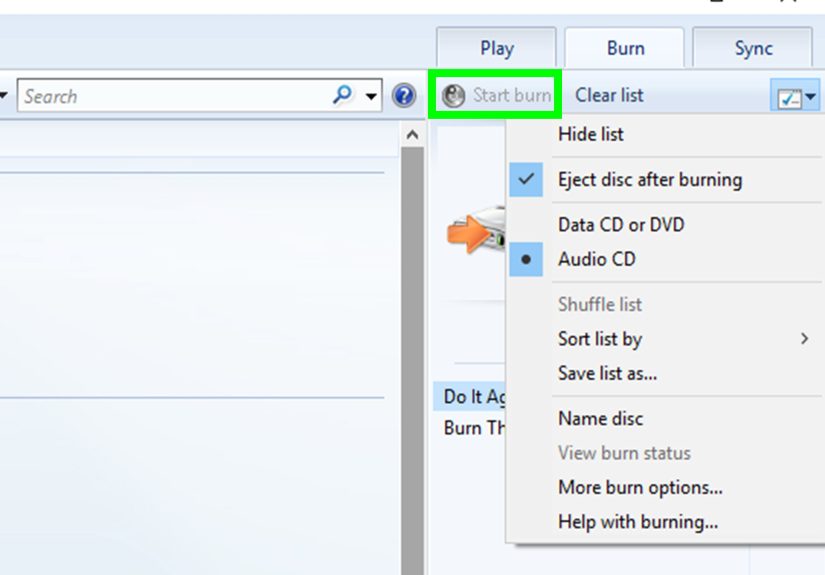
General Windows audio CD burn steps:
- Insert a blank CD-R (not CD-RW unless you specifically need rewritable).
- Open your burning software and choose Audio CD.
- Add your tracks and confirm the total runtime is under the disc limit.
- Set burn speed (a slower speed can reduce errors on some drives).
- Start the burn and finalize the disc if prompted.
On Mac
Mac options vary depending on your macOS version and what apps you use. Many people burn using:
- Music library apps (if they support disc burning in your setup)
- Finder-based disc creation for data discs
- Third-party burning apps for more control
General Mac audio CD burn steps:
- Connect an external USB CD burner if your Mac doesn’t have one built in.
- Open a burning app that supports Audio CD.
- Create a burn playlist, confirm total time, and burn.
- Finalize the disc for maximum compatibility.
Step 4: Test it (yes, immediately)
Test the CD in:
- Your computer
- The intended CD player (especially if it’s a car stereo)
- At least one other device if possible
If it plays on your laptop but not in your car, don’t panicyour car stereo is just picky, like a cat with a new food brand.
Make It Look and Feel Like a Real Mix CD
Use CD-Text (if available)
Some burning software can write track titles (CD-Text). Some players display it, some don’t. It’s a nice touchlike putting a cherry on top of your nostalgia sundae.
Label it the right way
- Use a soft-tip CD marker (not a ballpoint pen that scratches).
- Avoid adhesive labelssome can peel, wobble, or cause playback issues.
- Write the title, date, and maybe a tiny warning like “Track 7 is emotionally reckless.”
Add a tracklist insert
Print a simple tracklist or write one by hand. A mix CD without a tracklist is like a sandwich with no breadtechnically possible, but confusing to witness.
FAQ: What People Usually Ask (and What Actually Works)
“Can I legally convert YouTube videos to MP3 for a mix CD?”
Generally, noat least not for most copyrighted music. It usually violates YouTube’s terms and may infringe copyright. If the music is your own or clearly licensed for download and reuse, you may be able to use it within the license terms.
“What if the song is ‘free’ on YouTube?”
Free to listen doesn’t mean free to copy. Streaming permission isn’t the same as download-and-distribute permission.
“Can I make a mix CD as a gift?”
Legally, it’s complicated and depends on where you live and how the music is licensed. Practically, gifting mix CDs is common, but the safest route is using music you own or have explicit permission to copylike your purchased downloads, public domain tracks, or licensed Creative Commons music.
“Why does my CD skip or not play?”
- The disc wasn’t finalized
- You used a data disc but the player expects an audio CD
- The burn speed was too fast for your drive/media combo
- The car stereo doesn’t like CD-RW or certain brands of CD-R
- The disc got scratched (CDs are dramatic like that)
Bottom Line: YouTube Is the Discovery ToolNot the Download Folder
If your goal is “music from YouTube on a mix CD,” the safest approach is: find the songs on YouTube, then get them from a legitimate source (purchase, artist download, licensed catalog, your own CD collection). You’ll end up with a mix CD you can actually feel good aboutone that doesn’t rely on shady tools, broken files, or questionable legality.
Now, let’s talk about what it’s like in the real worldwhere CD burners act possessed and Track 1 somehow becomes Track 01 (Final) (Really Final).
Real-World Experiences: What Making a YouTube-Inspired Mix CD Is Actually Like (500+ Words)
Most people don’t set out to become amateur audio engineers. They set out to make a mix CD, and suddenly they’re learning about file types, runtime limits, and why a car stereo from 2009 has the personality of a stubborn antique shop owner.
One of the most common experiences: you build the perfect playlistpure emotional architecturethen realize an audio CD has a strict time limit. The first time you hit that 80-minute wall, it feels unfair, like being told you can only pack one suitcase for a trip to a place you might move to permanently. That moment usually turns into “Okay, which song gets cut?” followed by five minutes of staring at the tracklist like it just asked a personal question.
Another classic: volume differences. Songs that come from different albums, eras, or recording styles can vary wildly in loudness. People often describe this as “Track 3 whispers sweet nothings, and Track 4 yells them through a megaphone.” A quick level check or normalization step can be the difference between a smooth listening experience and a playlist that feels like a haunted house of sound.
Then there’s the CD-R brand roulette. Some players love certain discs; others act like you inserted a potato. People often find that a disc plays perfectly on a laptop but fails in a car stereo. That’s usually because the computer is more forgiving, while the car system expects a finalized audio CD and may dislike CD-RW media. The fix is typically boring-but-effective: use a standard CD-R, burn as an Audio CD, and finalize the disc. It’s not glamorous, but neither is flossing, and it still matters.
File organization becomes its own mini-adventure. People may download purchased tracks, rip a few songs from CDs they own, and add a couple of licensed Creative Commons tracksthen realize everything is in different folders with names like “Downloads,” “Downloads (1),” and “PLEASE SORT ME.” The experienced move is to create one dedicated folder for the project, rename files clearly, and confirm each song is the correct version (radio edit vs. live version vs. “8-minute extended intro featuring accidental crowd noises”).
There’s also the surprise joy of sequencing. Many people discover that a great mix isn’t just “good songs in a row.” It’s pacingopening with something inviting, keeping energy shifts intentional, and saving the mood-change track for when it hits best. Sometimes people burn a first version, listen in the car, and then rebuild the whole order because the vibe was off. That’s normal. That’s the craft. That’s also why mix CDs are weirdly satisfying: they’re personal, and they reward attention.
Finally, there’s the nostalgia factor. People often report that once the CD is burned and labeled, it feels more “real” than a playlist. It’s tangible. It lives in a glove compartment. It can be handed to someone with a scribbled tracklist and a title like “Late Night Drives (Do Not Skip Track 7).” And even if you never make a second mix CD again, you’ll remember the first onepartly because it’s sentimental, and partly because your computer made you troubleshoot a CD drive like it was a spaceship control panel.
In other words: making a YouTube-inspired mix CD is equal parts music love letter and light technical quest. Do it the legal way, and it becomes a project you can be proud ofand actually play anywhere.