Table of Contents >> Show >> Hide
- Why the Xbox Series X Version Matters (And Why It’s So Hard)
- The Rough Landing: What Goes Wrong on Xbox Series X
- What’s Actually Happening Under the Hood
- The Good News: When It Works, It’s a True “Next-Gen” Showcase
- How to Make the Landing Smoother on Xbox Series X
- Is It Still Worth Playing on Xbox Series X?
- Experience Logbook: From the Xbox Series X Cockpit
Microsoft Flight Simulator arriving on Xbox Series X felt like watching a jumbo jet attempt a carrier landing: thrilling, loud,
and just a little bit “are we sure this is a good idea?” On paper, the Series X has the horsepower, the SSD swagger, and the
“next-gen” badge. In practice, Flight Simulator is a different beastpart game, part global data pipeline, part weather machine,
and part “why is this menu three clicks away from everything I need?”
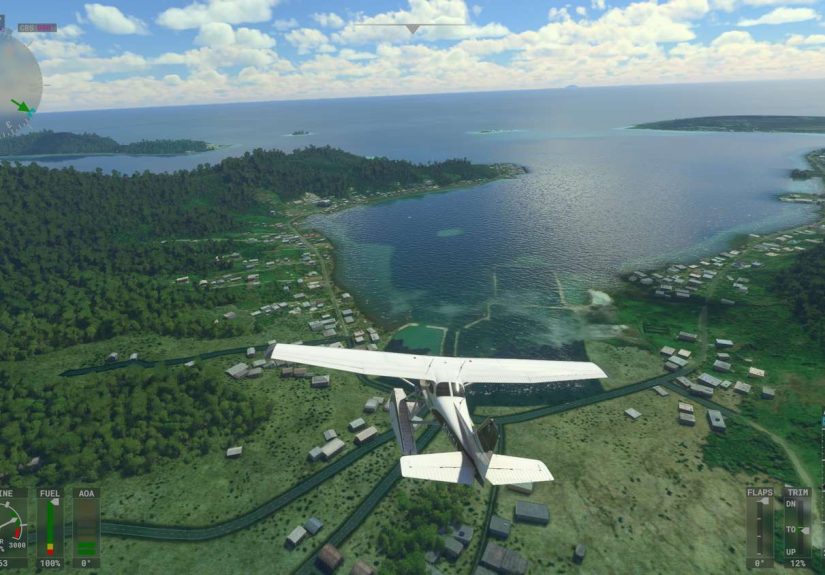
When it all clicks, it’s spectacular. The moment you punch through a cloud layer and the sun turns the wing into a glowing sheet
of aluminum is the kind of experience that makes you whisper, “Okay, fine, Microsoft. You win.” But when it doesn’t clickwhen
you’re stuck “checking for updates,” staring at a loading bar that ages faster than milk in July, or crashing right as you’re
about to grease the runwaywell, that’s the rough landing we need to talk about.
Why the Xbox Series X Version Matters (And Why It’s So Hard)
Flight Simulator isn’t a typical console port where you lower shadows, cap frame rate, and call it a day. The core magic comes
from a living, streamed planetsatellite imagery, photogrammetry in many areas, real-world weather, live traffic, and a constant
flow of “the world is huge” data. Even GameSpot notes the sim is continually downloading data to populate the world, and that
load times can be long because of the density and scope involved. That design is a flex… and also a frequent source of pain.
Console players also arrive with different expectations. On PC, long loads and occasional stutters get filed under “the cost of
doing business.” On Xbox Series Xwhere plenty of games teleport you from dashboard to gameplay in secondsFlight Simulator’s
startup routine can feel like you’re waiting for the airport shuttle that was “two minutes away” forty-five minutes ago.
The Rough Landing: What Goes Wrong on Xbox Series X
1) Load Times That Laugh at Your Free Time
There are two kinds of Flight Simulator sessions on Xbox: the ones where you’re flying in five minutes, and the ones where you
have time to start a load, make a sandwich, eat the sandwich, reconsider your life choices, and still come back to a screen that
looks suspiciously unchanged. Long initial loading isn’t a new story for Flight Simulator, but on console it feels more jarring
because you can’t distract yourself with a second monitor and a thousand open tabs.
The “checking for updates” step can be especially demoralizing. Sometimes it moves quickly; sometimes it sits there like it’s
negotiating with the cloud. The problem is that the sim isn’t only loading a gameit’s validating content, syncing services,
and preparing a world that can change based on streamed scenery and live systems.
2) Crashes and Freezes at the Worst Possible Time
Flight Simulator has a special talent: it can behave perfectly during a scenic cruise, then decide it’s done with you right when
you’re 500 feet above the runway. The emotional arc is brutal: you line up the approach, trim the aircraft, nail the descent…
and the game vanishes like a magician who got bored mid-trick.
Not every player hits this, and updates over time have improved stability in many cases. Still, the pattern is recognizable:
complex areas, long sessions, heavy traffic/weather, and high-detail aircraft can increase the chance of performance dips or a
crash. When a sim is juggling the cockpit systems, the world stream, and the UIall inside a fixed console memory budgetthings
can get wobbly.
3) Streaming Scenery Can Mean Pop-In, Stutters, and “Surprise Minecraft City”
In the best-case scenario, streaming is what makes the sim jaw-dropping. In the worst-case scenario, your gorgeous approach into
a major city turns into a texture-loading race you did not agree to enter. Buildings may sharpen late, photogrammetry can morph,
and you might see detail “snap” into place like the world is being assembled by an underpaid stage crew.
Internet quality matters more here than in most games. Flight Simulator can work with limited bandwidth, but the experience
changes: fewer details, slower streaming, and more noticeable transitions. That’s the hidden trade of the “entire planet” pitch:
the planet has to get to your console somehow.
4) The UI and Controls: Smart Ideas, Clunky Moments
Microsoft and Asobo did real work making the sim usable on a controller, and many reviews praise how accessible it is to get
airborne. But there’s still frictionespecially when you’re dealing with cockpit interactions, tiny switches, and layered menus
that were born on PC.
Even positive critics have pointed out interface awkwardness. The console version often asks you to do “controller yoga”:
hold a trigger, click a stick, nudge a cursor, open a radial, confirm, then wonder if you just turned on the landing lights or
ejected the passengers into the stratosphere (kidding… mostly).
What’s Actually Happening Under the Hood
The Series X Isn’t WeakFlight Simulator Is Just Absurd
The Xbox Series X version can look incredible. GameSpot describes a visually captivating 4K presentation running at 30fps on
Series X, which is an achievement considering the scale of what’s being rendered. But that 30fps target is a deliberate choice:
Flight Simulator isn’t only about raw graphics. It’s also simulating aerodynamics, avionics, weather, traffic, and a world that
has to be streamed and cached in real time.
This is why you can see smooth performance in rural areas and then hit turbulence (the metaphorical kind) over dense cities.
More geometry, more data, more draw calls, more memory pressureplus you still need cockpit interactivity and stable controls.
Content Management Is Part of the “Game” Now
One of the sneakiest challenges on Xbox is storage and content sprawl. World updates, airports, aircraft, and optional packs can
balloon the install size. Some coverage even points out that on Xbox the sim can be split into separate filesone for the base
game and another for offline world dataso storage decisions can affect your experience.
Translation: you’re not just a pilot. You’re also an air traffic controller for your console’s storage, deciding which regions
and packages get to land on your SSD.
The Good News: When It Works, It’s a True “Next-Gen” Showcase
Let’s not miss what Flight Simulator gets right on Xbox Series X. It’s a technical flex that brings a historically PC-centric
genre to the couch. You can pick an airport, choose a plane, and be sightseeing in minutesno graphics settings spreadsheets,
no driver updates, no “why is my CPU at 97%” panic.
The console version also emphasizes training and discovery. If you want to learn gradually, you can. If you want to treat it like
a tourism machine and fly over landmarks, you can do that too. That flexibility is the reason players keep coming back even after
a few hard bumps.
How to Make the Landing Smoother on Xbox Series X
No, you can’t turn your Xbox into a $3,000 flight sim PC by believing hard enough. But you can reduce pain and increase
the odds that your sessions feel like aviation, not like troubleshooting a printer. Here are practical moves that consistently
help many players.
Prioritize a Stable Connection (Because the World Is Streaming)
- Use wired Ethernet if you can. Wi-Fi works, but consistency matters for streamed scenery.
- Avoid heavy network congestion during flights (large downloads/streams on the same network).
- If your data is capped, consider limiting streaming-heavy options to avoid surprise bandwidth burn.
Be Intentional With Installed Content
- Install only what you use: big world updates and optional packs can add bloat and extra complexity.
- Keep your storage comfortable: a nearly-full drive can make big games feel worse.
- When troubleshooting, temporarily reduce add-ons or optional content to isolate issues.
Tame the “Loading Issues” Trap
- Sync time and region settings if you’re hitting authentication/loading weirdness; official support guidance
specifically calls out time/region mismatches as a source of loading problems in some cases. - After a major update, expect first boot to take longercontent validation and caching can be heavier.
- If you’re stuck forever, a full restart of the game (and sometimes the console) can clear a hung state.
Fly “Smart” When Stability Matters
- Shorter sessions first: test stability with a quick hop before committing to a two-hour flight.
- Start simple: lighter aircraft and less dense areas can be more stable while you dial in settings.
- Reduce extra systems: live traffic, multiplayer, and extreme weather are awesomebut they add load.
Is It Still Worth Playing on Xbox Series X?
If you want the purest, most tweakable Flight Simulator experience, PC remains the king. But Xbox Series X offers something
different: a remarkably accessible way to experience the sim’s core wonderglobal exploration, real weather vibes, and the quiet
satisfaction of a well-managed descentwithout building a computer that sounds like a leaf blower.
The honest verdict is this: Flight Simulator on Series X can be breathtaking, but it’s not always effortless. Treat it like a
high-performance aircraft: incredible when operated within its limits, occasionally dramatic when pushed too hard, and very
capable of teaching you patiencewhether you asked for that lesson or not.
Experience Logbook: From the Xbox Series X Cockpit
Entry 1: The “Checking for Updates” Meditation Retreat. You sit down thinking, “Quick flight, twenty minutes,
I’ll be responsible.” Flight Simulator hears you and responds with a loading screen that could qualify as a mindfulness app.
At first you’re annoyed. Then you start noticing your breathing. Then you start naming your thoughts. By minute eight, you’ve
achieved inner peaceor mild delirium. When it finally loads, you’re so calm you choose a Cessna instead of a jet, because
apparently you’re a new person now.
Entry 2: The Manhattan Approach That Became a Flipbook. The plan: a sunset arrival into a major airport, skyline
glowing, a little radio chatter, vibes for days. The reality: buildings pop in like they’re shy. The frame rate dips, recovers,
dips again, and you realize you’re not flying so much as negotiating a truce between your aircraft and the city’s geometry.
You land anyway, because pride is a powerful fuel source.
Entry 3: The Weather Brag That Turned Into a Thunderstorm. You show someone the game and say, “It uses live
weather.” Instantly, the sky darkens like it heard you talking. Turbulence hits. The plane wiggles. Your passenger (a friend on
the couch) asks why the aircraft sounds angry. You reply, confidently, “This is realistic.” The friend nods and looks slightly
concerned for real-world aviation.
Entry 4: Controller Yoga, Now With Extra Stretching. You need to adjust a cockpit knob. You bring up the cursor.
You overshoot. You slow down. You finally highlight the correct switch. You click… and somehow activate something else. You
mutter, “Okay, we’re learning.” Ten minutes later you’re doing a full instrument start procedure with the grace of a surgeon and
the posture of a pretzel. When it works, it feels like you gained a new skill in lifelike parallel parking, but with more clouds.
Entry 5: The Perfect Landing You Will Mention Forever. After a few rough sessionsloads, stutters, maybe a crash
at an emotionally inconvenient momentyou finally get “the flight.” Everything streams smoothly. The cockpit responds. The
approach is stable. You flare at just the right time and touch down like the runway is made of velvet. You pause the game. You
breathe out. You consider taking a screenshot as proof, because you know no one will believe you if you simply describe it.
This is the cycle: frustration, wonder, victory, and then immediately starting another flight because you’re convinced the magic
is back for good (and honestly… sometimes it is).