Table of Contents >> Show >> Hide
- Why You Might Want to Hide an Instagram Story
- Way 1: Hide Your Instagram Story From Specific People
- Way 2: Share Your Story Only With Close Friends
- Hide Story From Someone vs. Close Friends: Which One Should You Choose?
- Extra Instagram Privacy Tips That Actually Help
- Common Mistakes People Make With Instagram Story Privacy
- Troubleshooting: Why Can Someone Still See My Instagram Story?
- Real-Life Experiences With Hiding Instagram Stories From Someone
- Final Thoughts
Instagram Stories are fun until you remember that your boss, your ex, your nosy cousin, and that one person who somehow notices everything all have eyeballs. Suddenly, that casual coffee selfie feels less casual and more like a public relations event. The good news is that Instagram gives you more control than many people realize. If you are wondering how to hide your Instagram story from someone, you do not need a dramatic social media breakup or a full account lockdown. You just need the right privacy setting.
In most cases, there are two best ways to control story visibility on Instagram. First, you can hide your story from specific people. Second, you can share your story only with Close Friends. Both methods are simple, both work well, and both save you from posting something and then immediately regretting your life choices. This guide breaks down exactly how each option works, when to use it, what it does not do, and how to avoid common mistakes. If you want smarter Instagram privacy without turning your account into a digital bunker, you are in the right place.
Why You Might Want to Hide an Instagram Story
Wanting more privacy on Instagram does not make you sneaky. It makes you normal. Stories feel casual because they disappear, but they are still social content shared with real people in your audience. Sometimes you want to post freely without overexplaining yourself to people who do not need a front-row seat.
Maybe you want to hide an Instagram story from an ex while you heal in peace. Maybe you do freelance work and do not want clients seeing your weekend chaos involving karaoke, fries, and questionable life decisions. Maybe you are planning a surprise party, venting to close friends, or posting family content that is not meant for every follower. Privacy settings exist for exactly these situations.
The key thing to understand is that Instagram story privacy is not one-size-fits-all. Sometimes you want to exclude one or two specific people. Other times, you want to include only a smaller trusted circle. That is why knowing both methods matters.
Way 1: Hide Your Instagram Story From Specific People
This is the most direct solution if you know exactly who you do not want to see your story. Instead of changing your whole account or overthinking every post, you simply tell Instagram, “Everyone can watch this except these people.” Clean. Efficient. Slightly satisfying.
How to Hide Your Story From Specific People
- Open the Instagram app and go to your profile.
- Tap the menu icon in the top-right corner.
- Open Settings and privacy.
- Find the story privacy section. On some app versions, this appears as Story or Hide story and live from.
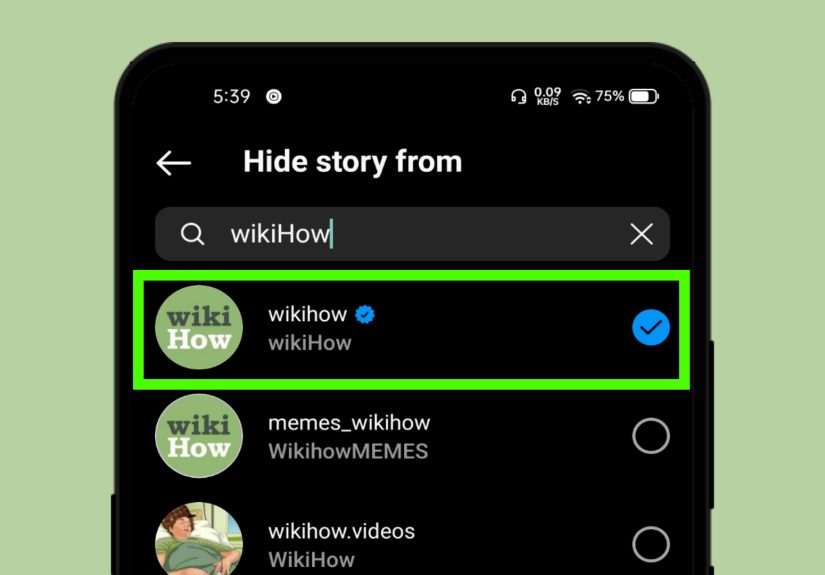
- Tap the option to hide your story from people.
- Select the account or accounts you want to exclude.
- Save your changes and go about your day like a stealthy adult.
Once those accounts are selected, your future Instagram Stories will not appear to them. This is the better option when your audience is mostly fine, but a few specific people are not invited to the party.
What This Method Is Best For
Hiding your story from specific people is ideal when you still want to share with most followers. It works well if you only need to block access for one person or a small group. Think coworkers, relatives, former partners, or anyone who turns a simple sunset story into a full investigation.
This method is also useful because it feels less disruptive than blocking someone. You are not starting a digital feud. You are just adjusting the blinds.
What This Method Does Not Do
This is where many people get confused. Hiding your Instagram story from someone does not automatically stop them from seeing your profile, feed posts, reels, or follower list. It only controls story access. So if your account is public, they may still view other parts of your profile unless you make your account private, remove them as a follower on a private account, or block them.
Also, remember that privacy settings apply to the account you selected, not every possible alternate account that person may have. If someone has a second profile, your carefully hidden story may still be visible there. Social media would be simpler if everyone had one account and one personality, but here we are.
A Shortcut You May See in Some App Versions
In some versions of Instagram, you may see a faster route from a person’s profile or from the viewer list on a story. If that shortcut appears, you can hide your story from that user directly. Instagram loves rearranging furniture in the app, so menu labels can shift, but the core function stays the same.
Way 2: Share Your Story Only With Close Friends
The second method flips the logic. Instead of choosing who to exclude, you choose who to include. This is the Close Friends feature, and it is perfect when you want your story seen by a small trusted group instead of your full follower list.
How to Set Up Close Friends on Instagram
- Go to your Instagram profile.
- Tap the menu icon in the top-right corner.
- Select Close Friends.
- Add the people you trust to that list.
- When posting a story, choose Close Friends instead of Your Story.
That is it. Your story will go only to the people on that list. Everyone else gets nothing. No preview. No accidental access. No dramatic audience confusion.
When Close Friends Is Better Than Hiding Someone
Close Friends is the better choice when you regularly post content for a smaller circle. If you are constantly hiding stories from a long list of people, it is usually easier to create a trusted audience instead. This works especially well for personal updates, inside jokes, travel content, dating-life commentary, private family moments, or anything that is more “group chat energy” than public broadcast.
It is also easier to maintain over time. Rather than constantly asking, “Who do I need to hide this from?” you ask, “Who actually needs to see this?” That is a much healthier question, both for privacy and for your peace of mind.
The Small Catch With Close Friends
Close Friends is private in one sense and visible in another. Instagram does not send a direct notification when you add or remove someone from your Close Friends list. However, people who can see your Close Friends story will notice the green ring around it. So while they are not officially “told,” they can absolutely figure out that they are on the list.
In other words, Close Friends is private, but not invisible. It is subtle, not secret-agent level.
Hide Story From Someone vs. Close Friends: Which One Should You Choose?
| Option | Best For | Main Advantage | Possible Drawback |
|---|---|---|---|
| Hide Story From Specific People | When you only want to exclude one or a few users | You can keep sharing with most followers | You have to remember to update the hidden list |
| Close Friends | When you want a smaller private audience | You control access more tightly | Viewers may recognize a Close Friends story by the green ring |
If your problem is one annoying viewer, hide your story from that person. If your problem is that your audience is generally too big, use Close Friends. That is the simplest rule.
Extra Instagram Privacy Tips That Actually Help
1. Make Your Account Private
If your account is public, your stories can be much easier for others to find. Making your Instagram account private limits access to approved followers. This will not replace the two story-hiding methods above, but it adds another layer of protection.
2. Review Story Reply and Sharing Settings
Story privacy is not only about who can view your content. It is also about who can reply to it, reshare it, or send it around. If you are tightening privacy, check your story message and sharing settings too. Otherwise, you might hide a story from one person only to have someone else forward screenshots and chaos.
3. Audit Your Followers Once in a While
Some people follow you for years and slowly drift from “friend” to “why are you still here?” If you have a private account, removing followers can be useful. It is less intense than blocking and more effective than quietly suffering.
4. Check Your Highlights
Stories disappear, but Highlights stick around on your profile. If you are serious about Instagram privacy, review what old story content still lives there. Your current privacy strategy should match your permanent profile content, not just what vanishes after 24 hours.
Common Mistakes People Make With Instagram Story Privacy
- Assuming story privacy covers the whole account. It does not. Feed posts and reels are separate.
- Forgetting about alternate accounts. Hiding from one username does not hide from another.
- Posting to Your Story instead of Close Friends by accident. A classic social media jump scare.
- Ignoring a public profile setting. Public accounts naturally expose more.
- Keeping an outdated Close Friends list. If the list still includes someone from three jobs ago, it may be time for maintenance.
Troubleshooting: Why Can Someone Still See My Instagram Story?
If you are sure you hid your story and someone still seems to know what you posted, a few things could be happening. First, double-check that you selected the correct account. Second, consider whether that person might be viewing from another profile. Third, make sure you posted to the intended audience. It is surprisingly easy to mean “Close Friends” and tap “Your Story” instead.
You should also update the app if menus or settings look strange. Instagram changes interface labels often, and older versions may display the privacy tools differently. When in doubt, search “story” inside Settings and privacy and work from there.
Real-Life Experiences With Hiding Instagram Stories From Someone
One of the most common experiences people have with Instagram story privacy starts at work. Someone wants to keep a professional image online, but they also want to be a normal human being on weekends. That does not mean they are doing anything wild. It may just mean they do not want their manager seeing every brunch, road trip, or “I called in sick but now I am holding iced coffee in broad daylight” moment. In that situation, hiding stories from one or two coworkers feels less dramatic than blocking them and far more practical than stopping story posting altogether.
Another common situation involves exes. Sometimes a breakup is over, but the viewing habits remain very much alive. You post one harmless selfie, and suddenly you are wondering whether it will be interpreted as a message, a revenge glow-up, or a coded cry for help. Hiding your Instagram story from an ex can make the app feel usable again. It creates breathing room. You stop performing for one specific viewer and start posting for yourself or for the people who actually support you.
Family adds another layer. Plenty of users love their relatives and still do not want them monitoring every story. Maybe your aunt asks follow-up questions about every restaurant. Maybe a cousin turns every post into a family group chat topic. Maybe your parents are supportive but a little too observant. Close Friends tends to work well here because it lets you create a smaller circle without constantly editing a hidden list every time you post.
Then there is the “friendly but not that friendly” category: old classmates, former coworkers, neighbors, clients, and casual acquaintances. These people are not doing anything wrong. You are just not interested in turning your story into a public bulletin board for everyone you have met since 2017. Many users discover that their stress goes down the moment they stop treating Instagram like an all-access pass. A smaller audience often leads to more natural posting, fewer second thoughts, and less deleting content two minutes after sharing it.
What most people experience after adjusting these settings is simple: relief. They post more comfortably. They overthink less. They stop staring at the viewer list like it is a stock market chart. And they realize privacy settings are not about being fake or secretive. They are about context. Not every update belongs in front of every person. Instagram becomes much more fun when you remember that “share” does not have to mean “share with absolutely everybody.”
Final Thoughts
If you want to hide your Instagram story from someone, the smartest approach depends on your goal. Use Hide Story From when you want to exclude specific people but still share with most of your audience. Use Close Friends when you want a smaller, more intentional group to see what you post. Both options are easy, both are effective, and both can make Instagram feel a lot less like a stage and a lot more like a tool you control.
The bottom line is simple: you do not need to stop posting, unfollow half the planet, or move to a cabin in the woods with no Wi-Fi. You just need better story privacy settings. Once those are in place, you can post with more confidence and a lot less audience anxiety.