Table of Contents >> Show >> Hide
- What “Hacking” Means Here (and What It Doesn’t)
- Rotary Phones 101: Why the Dial Is Basically a Tiny Drum Machine
- Safety First: Old Phones Are Friendly… Until They Ring
- Choose Your Adventure: 5 Legit Ways to Hack a Rotary Phone
- Project Path A: Getting a Rotary Phone to Dial on Modern Systems
- Project Path B: Hacking the Dial with a Microcontroller (Without Making It a Science Fair Volcano)
- Project Path C: Bluetooth Rotary Phone (A.K.A. The Desk Accessory That Steals the Show)
- Restoration Hacks: The Stuff That Makes Any Project Work Better
- Where Rotary Phones Fit in the History of “Modern” Dialing
- FAQ: Quick Answers Before You Buy Parts
- Real-World Maker Experiences: What It’s Like to Hack a Rotary Phone (500+ Words)
- Conclusion: Your Rotary Phone Isn’t OutdatedIt’s Under-Utilized
“Hacking a rotary phone” sounds like you’re about to call the Pentagon from your grandma’s kitchen. In reality, most rotary-phone
“hacks” are wholesome maker projects: restoring a classic, teaching old hardware new tricks, and turning a beautifully overbuilt
piece of mid-century engineering into something you’ll actually use in 2026.
This guide is all about legal, practical, non-sketchy rotary phone hackingthink modding, upcycling, and integration,
not stealing service or messing with telecom infrastructure. If your project can be explained with a soldering iron, a multimeter,
and a mild obsession with satisfying clicks, you’re in the right place.
What “Hacking” Means Here (and What It Doesn’t)
Let’s draw a bright line:
- Yes: restoration, repairs, cleaning, converting pulse dialing to touch tones, using a rotary dial as a USB keypad, adding Bluetooth, connecting to VoIP, art installations.
- No: instructions for bypassing billing, breaking into networks, phone phreaking techniques, or anything designed to access services you don’t own or have permission to use.
Rotary phones are a fun playground because their interfaces are mechanical, their signals are simple, and their parts were built to survive
toddlers, cats, and at least one family member who absolutely slammed the handset down after arguing with the cable company.
Rotary Phones 101: Why the Dial Is Basically a Tiny Drum Machine
A rotary phone doesn’t “send a number” the way a modern keypad does. Instead, it sends a rhythm. When you dial a digit and release the wheel,
the dial returns at a controlled speed and rapidly opens and closes a circuit. Those rapid interruptions are the pulse train.
Pulse dialing in plain English
- Dial “1” → 1 interruption (pulse)
- Dial “7” → 7 pulses
- Dial “0” → 10 pulses (because telecom history loves a little chaos)
Classic rotary dials are engineered to return at a steady pace using a governor (a mechanical speed regulator). That’s why a good dial
feels smooth and consistentand why a gummed-up dial feels like it’s dragging through peanut butter.
Safety First: Old Phones Are Friendly… Until They Ring
Most of the time, a rotary phone is low-risk to work on, especially if you’re using it on a VoIP adapter or a bench setup. But there’s one moment
when a “cute vintage gadget” becomes “surprise electricity lesson”: the ring signal.
Traditional phone systems use a higher-voltage AC ring signal (often cited around 90V AC at about 20 Hz). That’s usually not lethal,
but it can definitely startle you into inventing new swear words. Treat unknown wiring with respect, don’t work on a live line if you’re unsure,
and consider testing with modern adapters designed for hobby use.
Choose Your Adventure: 5 Legit Ways to Hack a Rotary Phone
Before you buy parts, decide what “success” looks like. Here are the most popular rotary phone hacks, from easiest to most “I accidentally built a museum exhibit.”
1) Make it work on modern calling (VoIP or compatible service)
If you want your rotary phone to actually place calls, your biggest obstacle is the signaling method. Modern systems expect
DTMF (touch-tone) tones, not pulse clicks. The fix is either:
- Use a VoIP ATA that supports pulse dialing (some do), or
- Add a pulse-to-tone converter between the phone and the line/adapter.
The practical difference: a pulse-capable ATA interprets the clicks directly; a converter listens to the clicks and then “replays” them as DTMF tones.
2) Turn it into a Bluetooth “cell phone handset”
This is the crowd-pleaser: your smartphone stays in your pocket, but you answer calls on a rotary handset like you’re in a noir film.
The dial can be repurposed for speed-dial macros (“Dial 1 for spouse, dial 2 for pizza, dial 3 to pretend you’re busy”).
3) Use the rotary dial as a computer input device
The rotary dial is basically a gorgeous, tactile number-entry peripheral. With a microcontroller, you can translate dial pulses into keyboard input
and use it as a USB keypad, password entry device, or game controller.
4) Build an escape-room puzzle or interactive art phone
Rotary phones are perfect for puzzles: the dial forces slow, deliberate input, and the phone itself sets a mood. Many makers build setups where dialing a
correct sequence triggers an audio message, opens a lock, or starts a timed event.
5) Restore and preserve (the “museum-quality” hack)
Not every hack needs a microcontroller. A deep clean, a cord replacement, and a properly adjusted dial can bring a neglected phone back to life
and you’ll learn a lot about analog design along the way.
Project Path A: Getting a Rotary Phone to Dial on Modern Systems
If your goal is “I want to call people with it,” here’s what matters most.
Step 1: Confirm what signaling your system accepts
Modern VoIP adapters (ATAs), PBX systems, and “landline replacements” vary a lot. Some support pulse dialing, many don’t.
If yours doesn’t, a pulse-to-tone converter is often the cleanest solution.
Step 2: Understand the rotary phone’s two “personalities”
Most rotary phones have:
- Talk circuit: mic + earpiece through the phone’s internal network
- Dial circuit: contacts that open/close the loop to create pulses
In many designs, the dial also has an “off-normal” contact that temporarily mutes the earpiece during dialingso you don’t hear the clicking like a woodpecker in your skull.
If you’re reading pulses with electronics, that off-normal signal can be useful for knowing “dialing is happening now.”
Step 3: Keep your expectations realistic about star (*) and pound (#)
Rotary phones don’t have * and #. Some converters and systems can map extra gestures (like hook-flash patterns or long dials) to those symbols,
but you should plan around it. If you rely on IVR menus (“Press pound to continue”), you may need a workaround:
- A converter that provides extra buttons,
- A tiny hidden keypad, or
- Speed-dial presets that include those tones.
Step 4: Watch the ringing load (REN) if you’re using real telephone interfaces
Old phones can have loud mechanical ringers that draw more ringing power than modern ports like to supply. The industry measure here is
REN (ringer equivalence number). In many contexts, the combined REN load on a line is recommended not to exceed about 5.0.
If your phone won’t ringor rings weaklyREN and ring voltage are the first suspects.
Project Path B: Hacking the Dial with a Microcontroller (Without Making It a Science Fair Volcano)
If you want to use the rotary dial as an input device (USB keypad, puzzle controller, automation trigger), you’ll be reading the pulse contact as a digital signal.
What you’re actually reading
When the dial returns, it produces a repeating open/close pattern. Classic dialing standards commonly target around 10 pulses per second,
and systems often expect a certain make/break timing ratio. In practice, your microcontroller code just needs to:
- Detect the beginning of a dial event (off-normal contact or first pulse).
- Count pulses until the dial stops.
- Translate pulse count to a digit (10 pulses → “0”).
- Debounce and ignore jitter so you don’t turn “7” into “77” (which is how horror movies start).
Why debouncing matters more than you think
Rotary dials are mechanical switches. Mechanical switches bounce. Your code should treat a pulse as “real” only after a stable minimum time,
or by sampling at a steady interval and detecting clean edges. If you skip this, your dial will feel like it’s gaslighting you.
Example builds that makers love
- USB number pad: Dial “5” → types “5” on your computer.
- Unlock code puzzle: Dial a sequence → triggers a relay or opens a solenoid.
- Audio phone: Dial a number to play a recorded message, a voicemail-style story, or a sound effect.
Project Path C: Bluetooth Rotary Phone (A.K.A. The Desk Accessory That Steals the Show)
Converting a rotary phone into a Bluetooth handset is popular for a reason: it looks incredible, it’s usable daily, and it makes every call feel
like you’re about to say, “We’ll talk when the shadows are longer.”
Core concept
A Bluetooth “handsfree” setup needs a microphone input and a speaker output. A rotary handset already contains a mic and an earpiece speaker
so you’re adapting levels/impedance and fitting modern audio electronics inside the phone base.
The hook switch becomes your superpower
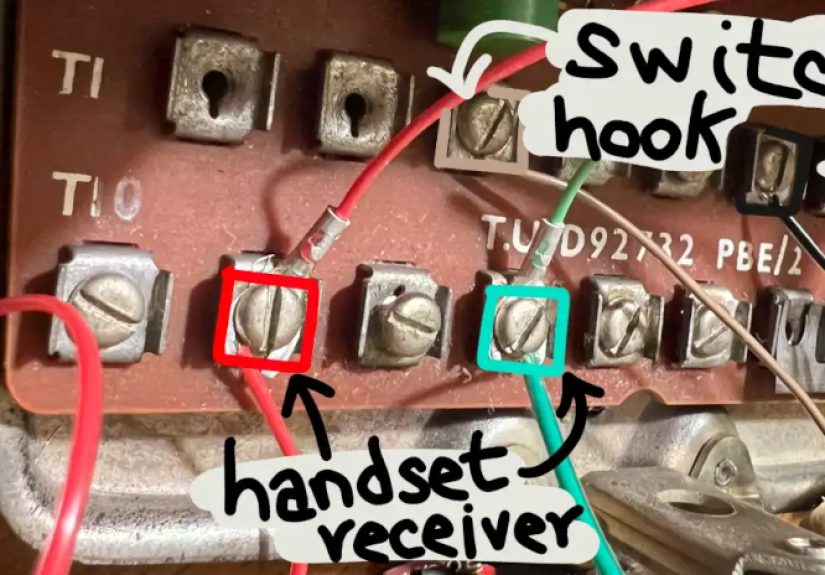
The hook switch (the cradle button that detects when the handset is lifted) can be used as:
- Answer / hang up signal
- Play / pause control for music
- Push-to-talk style trigger (for certain apps)
If you add a microcontroller, the dial can become a command interface: dial “1” to answer, dial “2” to redial, dial “9” to toggle mute, etc.
This is where rotary “hacking” feels magical: you’re using the original controls, not hiding new ones.
Restoration Hacks: The Stuff That Makes Any Project Work Better
Even if you’re building a modern hybrid, spending an hour restoring the mechanicals pays off. A clean, smooth dial improves signal timing,
and a solid hook switch prevents intermittent “hello? hello? are you there?” moments.
Common problems (and the non-destructive fixes)
- Dial returns slowly: Old grease or dust in the governor/gears. Clean carefully; use minimal lubrication appropriate for small mechanisms.
- Mis-dials (“8” becomes “9”): The dial speed/timing may be off, or contacts are dirty.
- Weak ringing: Ringing power limitations (REN/ring voltage), worn ringer parts, or a modern adapter that can’t drive mechanical bells well.
- Scratchy audio: Cord issues, corrosion, or aging components in the internal network.
Pro tip: test before you modify
Before you tear into the phone for a Bluetooth conversion, test the dial pulse output and hook switch continuity. It’s easier to debug one system at a time:
first confirm the original mechanics are healthy, then integrate modern electronics.
Where Rotary Phones Fit in the History of “Modern” Dialing
Rotary dialing dominated for decades, but by the early 1960s, the Bell System introduced push-button dialing using dual-tone multi-frequency signaling,
commonly known as Touch-Tone. Those tones made switching faster and enabled interactive systems (and later, the “press 1 for… press 2 for…” universe).
That shift is why rotary hacking exists at all: rotary phones still work wonderfully as audio devices, but the world stopped listening for their clicks.
Your project is basically an interpreter between two eras: pulses on one side, tones or digital commands on the other.
FAQ: Quick Answers Before You Buy Parts
Can I plug a rotary phone into a modern wall jack?
Sometimes, but it depends on your provider and equipment. Many modern services don’t support pulse dialing. A pulse-capable ATA or a pulse-to-tone converter
is often the practical route.
Why does my rotary phone dial fine but won’t ring?
Mechanical ringers can demand more ringing power than modern adapters provide. Check your equipment’s REN limits and consider a ring booster if needed.
Is this legal?
Modding your own device for personal use is generally fine. What’s not fine: using hacks to access telecom services without permission or bypass billing.
Keep it on the maker side of the line.
Do I need to preserve the phone’s original circuitry?
Not always. Preservation is great if you’re restoring a collectible set. But if your goal is a daily-use Bluetooth phone, you may choose to keep the
handset elements and hook switch while redesigning the rest. Just avoid irreversible changes if the phone has historical or collector value.
Real-World Maker Experiences: What It’s Like to Hack a Rotary Phone (500+ Words)
The first “experience” most people have when hacking a rotary phone is the moment they realize they’ve adopted a tiny mechanical pet. You don’t own the dial;
the dial owns you. You’ll catch yourself testing it “one more time” because the return feels slightly different after cleaning. It’s the kind of tactile feedback
modern gadgets just don’t give youyour smartphone never says “nice job” with a perfectly-timed click.
If you start with a thrift-store phone, the second experience is detective work. You’ll pop the case and find a world of color-coded wires, screws that look like
they were machined by a patient wizard, and dust that has clearly been paying rent since 1974. Cleaning becomes oddly satisfying: nicotine film comes off in slow
swipes, plastic brightens, metal parts stop looking “vintage” and start looking “intentional.” You also learn quickly that “just a drop of oil” means
just a drop. Add too much and the dial goes from “precision instrument” to “slippery chaos.”
When you move into electronics, you’ll likely have a moment of confusion that turns into a breakthrough: “Why are there two dial-related contacts?”
That’s where the phone teaches you its language. One contact is the pulse train itself; another often marks “off-normal,” telling the circuit that dialing is in progress.
Makers who use microcontrollers quickly discover that off-normal is gold: it lets your code know when to start paying attention and when a digit has ended,
which makes the whole system feel less like guessing and more like listening.
Then comes the timing rabbit hole. You’ll see advice like “10 pulses per second” and “make/break ratio” and think, “Sure, sure, numbers, whatever.”
But in real builds, timing is the difference between a dial that’s charmingly old-school and a dial that invents new phone numbers. A common, very human experience:
you dial your own number, it fails, you dial again, it fails again, and you start blaming the universeuntil you realize your code counted a bounce as a pulse.
The fix is rarely dramatic; it’s usually two lines of debouncing logic and a deep breath.
If you go the VoIP route, you’ll probably experience the modern telecom version of “try turning it off and on again.” Sometimes the ATA is finebut buried in a menu
is a setting like “pulse dialing: disabled.” Once you flip it, the phone feels like it time-traveled into the present. That’s the magic moment: you rotate the dial,
release it, and hear the call actually place. No app. No touchscreen. Just clicks, like the phone always wanted.
Bluetooth builds are a different kind of joy. The first time you answer a smartphone call by lifting a rotary handset, it’s absurdly delightfullike wearing a tuxedo
to the grocery store. People nearby will look over. Someone will ask, “Does that work?” and you’ll get to say, “Yes,” with the quiet confidence of a person who has
soldered tiny wires at midnight and emerged victorious. The dial becomes a conversation starter even if you never use it for actual dialingbecause it’s not just
nostalgia; it’s interaction you can feel.
Finally, there’s the experience you don’t expect: rotary projects slow you down in a good way. They force intentional input. You can’t rage-dial. You can’t speed-text.
You have to choose each digit, wind the dial, and let it return. In a world of instant everything, that tiny ritual is oddly calminglike your phone is reminding you
that communication used to require a little patience… and maybe a little more respect for mechanical engineering.
Conclusion: Your Rotary Phone Isn’t OutdatedIt’s Under-Utilized
Hacking a rotary phone is a perfect maker project because it sits at the intersection of history, design, mechanics, and practical electronics.
You can keep it authentic and make it functional again, or you can turn it into something delightfully newwithout losing what made it special.
The best rotary hacks don’t hide the old parts; they celebrate them.