Table of Contents >> Show >> Hide
- Why Scheduling Works: The “Pause” Your Feed Deserves
- What Counts as a “Hot-Headed” Tweet?
- The Scheduling Mindset: Replace “Reply” With “Review”
- How to Schedule Tweets Natively on X
- Scheduling Tools: When You Need More Than “One Post at a Time”
- Build a “Cooling-Off” Tweet Workflow That Actually Sticks
- Scheduling Isn’t Just for Anger: It’s Also for Consistency
- When Not to Schedule: The “Read the Room” Rule
- Advanced Tips: Make Calm Posting Your Default Setting
- of Experiences: Realistic Scenarios Where Scheduling Saves the Day
- Conclusion: A Calm Timeline Is Built, Not Hoped For
Hot take: your thumbs are faster than your frontal lobe. And on X (formerly Twitter), that’s not a cute personality quirkit’s a business risk, a reputation risk, and sometimes a “why did I do that?” risk.
Scheduling tweets sounds like something only brands and social media managers do. But it’s also one of the simplest personal “cool-down” tools you can use online: it puts a speed bump between emotion and publication. If you’ve ever typed a spicy reply, hovered over “Post,” and felt your pulse doing the cha-cha… scheduling is your new best friend.
This guide shows you how to use tweet scheduling as a buffer (small “b,” not necessarily the app) so you can stay consistent, sound smart, and avoid launching a one-person PR crisis because someone tweeted “Actually…” at you with the confidence of a medieval knight.
Why Scheduling Works: The “Pause” Your Feed Deserves
Anger is fast; consequences are faster
When you’re irritated, your brain is trying to be helpful by going into “solve the threat now” mode. The problem is that social media is not a bear encounter. It’s a stadium microphone. A quote-tweet can turn into a pile-on, your words can be screenshotted, and the internet has an Olympic-level memory for awkward moments.
Scheduling creates a built-in cooling-off period. Instead of reacting in real time, you draft your post and set it to publish later. That time gap is where better judgment shows upalong with typos you didn’t see, assumptions you didn’t question, and that one sentence that sounded “witty” but reads like a villain monologue in daylight.
The real magic is separating writing from publishing
Think of scheduling like putting your tweet in the fridge. You can still make the sandwich (write the tweet). You just don’t have to eat it immediately (post it). Later, you can decide if it still tastes good, if it needs more context, or if you should throw it out entirely and order something healthierlike silence.
What Counts as a “Hot-Headed” Tweet?
Not every strong opinion is a bad idea. The issue is impulsive posting: the kind that’s driven by heat, not strategy. Here are common triggers that lead to regrettable posts:
- Being misunderstood (and wanting to correct the record immediately).
- Feeling disrespected (especially in public replies).
- Competitor envy (when someone else’s post pops off).
- Breaking news (when you’re tempted to react before facts are clear).
- Customer complaints (when your patience clock hits 0%).
If your first draft includes phrases like “Clearly you didn’t read,” “Everyone knows,” “I’m not even mad but,” or “Let me educate you,” congratulations: you’ve written a tweet that will age like a banana in a hot car.
The Scheduling Mindset: Replace “Reply” With “Review”
Use the 3-question filter
Before you schedule anything that was born from irritation, run it through three questions:
- What’s my goal? (Inform? Clarify? De-escalate? Protect my brand voice?)
- What’s the likely outcome? (Helpful conversation? Dunk contest? Misinterpretation?)
- What would I change if this went viral? (If the answer is “everything,” don’t post it.)
Try the “tomorrow-me” test
Read your tweet as if you’re calmer, more rested, and mildly embarrassed by your current mood. If tomorrow-you would edit it, schedule it and edit it tomorrow. If tomorrow-you would delete it, you just saved yourself a very public headache.
How to Schedule Tweets Natively on X
X’s native scheduling options can change, but the most reliable place to find scheduling is usually the desktop web experience. If you don’t see a scheduling option on mobile, don’t assume you’re doing something wrongplatform features can vary by device, account type, and ongoing UI updates.
Step-by-step: schedule a post on desktop web
- Open X on a desktop browser and click into the post composer.
- Write your post (text, images, GIFs, hashtagskeep it human).
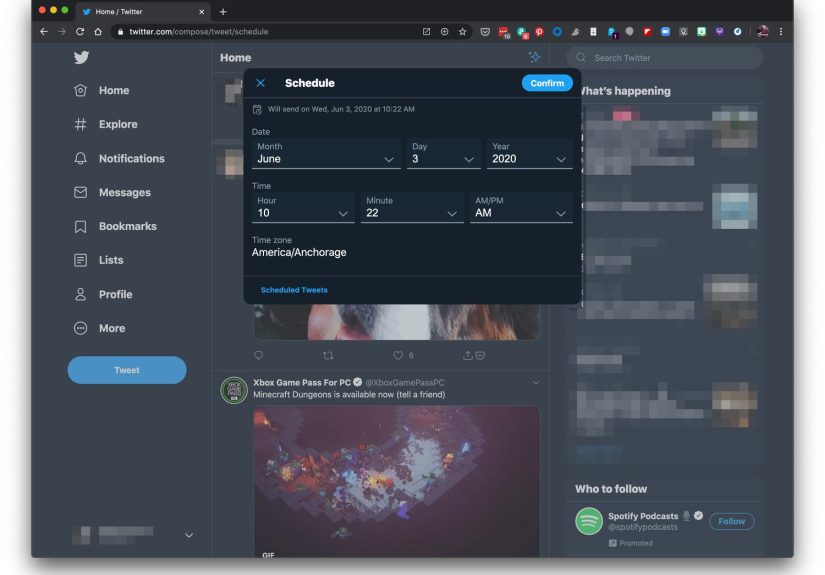
- Click the calendar icon in the composer (this is the scheduling control).
- Select date and time for publication.
- Confirm the schedule, then click Schedule (or the platform’s equivalent button).
Where to find your scheduled posts
Scheduled posts are typically stored with drafts/unsent content. Look for something like Unsent posts, Drafts, or a scheduled section inside the composer flow. This matters because your real power move is not just schedulingit’s editing after you cool down.
Edit, reschedule, or delete (the underrated feature)
Scheduling is not a contract with your past self. If you re-read your tweet and realize it’s too harsh, too vague, or too likely to start a comment-section cage match, you can:
- Edit for clarity and tone.
- Reschedule to a later time (or never o’clock).
- Delete and enjoy the rare peace of a good decision.
Scheduling Tools: When You Need More Than “One Post at a Time”
If you manage multiple accounts, collaborate with a team, or want a full content calendar, third-party social media management tools can help. Just remember: integrations with X can evolve because API access policies change over time, so always confirm your tool’s current capabilities inside the product.
What third-party schedulers are best for
- Content calendars (seeing your week/month at a glance).
- Approval workflows (draft → review → scheduled).
- Bulk scheduling (planning a campaign without living in the composer).
- Cross-posting (adapting one idea for multiple platforms).
- Analytics (learning what works so you tweet smarter, not louder).
The “two-person rule” for spicy posts
If your tweet addresses a controversial topic, a customer dispute, or a competitor, consider a simple rule: no hot replies without a second set of eyes. Even if you’re a solo creator, you can simulate this by scheduling the post for later and reviewing it when you’re calm.
Build a “Cooling-Off” Tweet Workflow That Actually Sticks
Step 1: Create a personal delay policy
Set a rule you can follow without negotiating with yourself every time. Examples:
- 10-minute rule: If I’m annoyed, I draft and wait 10 minutes before scheduling.
- 1-hour rule: If I’m angry, I schedule it at least one hour out and reread first.
- Overnight rule: If it’s about a person or a brand, it waits until tomorrow.
Step 2: Write the tweet you want to send (then rewrite the tweet you should send)
Give yourself permission to write the “messy version” in a draft. Then rewrite it into something that aligns with your goals. Here’s a simple transformation:
- Messy draft: “This is the dumbest take I’ve seen all week. Learn how this works before posting.”
- Better version: “I see it differently. Here’s what I’m basing my view on, and where I think the nuance matters.”
Notice the difference: the second version keeps your point and drops the insult. You’re still youjust less likely to trend for the wrong reason.
Step 3: Run the “screenshot checklist”
Before you schedule, ask:
- Would I be okay if this was screenshotted without context?
- Does it sound like I’m attacking a person instead of addressing an idea?
- Am I making a claim I can’t back up?
- Could this be misread as discriminatory, harassing, or threatening?
- Is there any private information here (mine or someone else’s)?
Step 4: Use templateswithout sounding templated
You can keep your voice and still use a structure that reduces heat. Try these formats:
- “I hear you + my view”: “I get the concern. My experience has been differenthere’s why.”
- “Clarify + invite”: “To clarify what I meant: ____. Happy to discuss if we keep it constructive.”
- “Fact + source type”: “Worth noting: ____. This is based on reported data/official guidance/primary docs.”
- “Boundary + exit”: “I’m not going to debate personal attacks. If you want to talk specifics, I’m here.”
Scheduling Isn’t Just for Anger: It’s Also for Consistency
Even when you’re calm, scheduling helps you avoid reactive posting habits. It supports:
- Consistent posting without doomscrolling for “something to say.”
- Better timing so your thoughtful content isn’t buried under lunch-hour chaos.
- Campaign planning (launches, events, content series).
- Evergreen posts that keep working when you’re offline.
The best part? Consistency reduces stress. When you know you already have posts queued, you feel less pressure to respond instantly to every mention, quote-tweet, or “respectfully…” reply.
When Not to Schedule: The “Read the Room” Rule
Scheduling is powerful, but it’s not “set it and forget it.” Some situations require caution:
Pause scheduled posts during major news events
If something serious is happening (tragedy, crisis, breaking news), a cheerful scheduled post can land badly. Build a habit of checking your queue dailyespecially if you schedule far ahead.
Don’t schedule replies you haven’t re-read
Replies are where emotions run hottest. If you’re scheduling a response to a person, the bar for clarity and tone should be higher than for an evergreen tip.
Be careful with promotions and endorsements
If you’re posting about a product, partnership, affiliate link, or sponsorship, make sure your disclosure is clear and easy to notice. Scheduling helps because you can double-check compliance before anything goes live.
Advanced Tips: Make Calm Posting Your Default Setting
Keep a “draft parking lot”
Create drafts for posts you’re not ready to publish. Drafts are where impulsive thoughts go to cool off. You can revisit later and decide whether they become a thoughtful post, a private note, or a lesson in restraint.
Create an “evergreen library”
Make a short list of content that’s always safe and useful: FAQs, best tips, resource threads, clarifications of your most common point, and links to your work. When you’re tempted to rage-post, schedule something helpful instead. Petty? No. Strategic.
Use a tone-check buddy (even if it’s future-you)
If you don’t have a teammate, schedule your post for later and re-read it in a different setting: after a walk, after food, after sleep. You’re basically changing your brain’s “operating system” before approving the final version.
of Experiences: Realistic Scenarios Where Scheduling Saves the Day
Below are composite, true-to-life scenarios that mirror what creators, founders, customer support teams, and everyday users commonly run into on X. The details vary, but the pattern stays the same: emotion shows up quickly, and scheduling gives you time to respond like a human with a plan.
Scenario 1: The customer complaint that felt personal
A small business owner sees a public reply: “Your shipping is a joke.” The owner is already tired, already behind, and the sentence hits like a shove. The first draft is pure heat: “We’re not Amazon. Read the policy.” Instead of posting, they schedule it for two hours later. Thirty minutes after that, they reread and realize the tweet sounds defensive and dismissiveeven if the policy is correct.
They rewrite: “I’m sorry your order hasn’t arrived yetDM me your order number and I’ll look into it. We’re currently running 2–3 days behind, and we’re working through the backlog.” Same reality, totally different impact. The revised tweet doesn’t invite a fight; it invites resolution. Scheduling didn’t make them weaker. It made them effective.
Scenario 2: The quote-tweet temptation
A creator sees a viral post that oversimplifies their niche. Their fingers start typing a quote-tweet that would definitely get likesmostly from people who enjoy conflict as a sport. They draft the clapback and schedule it for the next morning. Overnight, the emotional charge fades. In the morning, the creator asks: “Do I want my audience to associate me with teaching or dunking?”
They keep the core idea but remove the target. Instead of quote-tweeting, they post a standalone explanation: “A quick nuance that often gets missed about ____. Here are 3 things to consider.” The creator still contributes, still gets engagement, and doesn’t chain themselves to someone else’s bad take for the rest of the day.
Scenario 3: The founder hot take during breaking news
A startup founder wants to comment on breaking industry news. They draft a confident post with a spicy prediction and schedule it for later so they can “polish it.” An hour passes and more information comes outturns out the original report was incomplete. Because the post was scheduled, not published, they can update it with accurate context instead of posting a correction thread that makes them look reckless.
This is the underrated benefit of scheduling: it’s not only a mood buffer, it’s a facts buffer. When the story is still forming, time is your friend.
Scenario 4: The personal account that doubles as a professional brand
Someone who’s job-hunting uses X to share thoughts and connect with people in their field. One night, they get pulled into an argument. The “mic drop” tweet feels satisfying in the moment, so they schedule it for 20 minutes later. During that window, they remember something important: recruiters, colleagues, and future managers are part of the audienceeven if they never reply.
They delete the scheduled tweet and post something calmer: “I’m stepping away from this thread. If you have data that supports your view, I’m open to reading it.” That choice doesn’t go viral. It does something better: it protects their reputation while keeping their dignity intact.
Across all these scenarios, the lesson is consistent: scheduling gives you time to choose the version of yourself you actually want to publish. Not the hungry version. Not the sleep-deprived version. Not the “I can’t believe you said that” version. The steady versionthe one who can disagree without detonating the conversation.
Conclusion: A Calm Timeline Is Built, Not Hoped For
If you do one thing after reading this, make it this: turn emotional replies into scheduled drafts. Scheduling is not just a productivity trickit’s impulse control for the internet age. It helps you protect your brand voice, keep your credibility, and show up consistently without letting the loudest moment in your day decide what the world sees.
And if you ever wonder whether it’s “worth it” to delay a tweet, remember: posting is instant. Regret has a longer shelf life.