Table of Contents >> Show >> Hide
- What Co-Op Means in Resident Evil 6
- Resident Evil 6 Co-Op Options at a Glance
- How to Play Offline Split-Screen Co-Op in Resident Evil 6
- How to Host Online Co-Op in Resident Evil 6
- How to Join a Friend’s Online Co-Op Game
- Best Campaigns for Co-Op Beginners
- Important Co-Op Settings to Understand
- Common Resident Evil 6 Co-Op Problems and Fixes
- Co-Op Tips That Make Resident Evil 6 More Fun
- Is Resident Evil 6 Better in Co-Op?
- Conclusion: The Best Way to Play Co Op in Resident Evil 6
- SEO Tags
Note: This publish-ready guide is based on verified gameplay information from official game manuals, platform store listings, and established co-op gameplay resources. Source links are intentionally not inserted in the article body.
Resident Evil 6 is many things: dramatic, chaotic, loud, occasionally ridiculous, and absolutely convinced that every hallway should end with an explosion. But one of its best features is also one of the easiest to miss if you are new to the game: co-op. Whether you want to play split-screen on the couch or team up online with a friend, Resident Evil 6 was built around partner-based campaigns, shared panic, and the timeless joy of yelling, “Why did you open that door?”
This guide explains exactly how to play co op in Resident Evil 6, including offline split-screen, online campaign co-op, joining a friend’s session, hosting your own lobby, and fixing common setup problems. It also covers campaign pairs, story intersections, Mercenaries mode, platform differences, and practical co-op tips that will keep you from becoming the teammate who uses every healing item five minutes into Chapter 1.
What Co-Op Means in Resident Evil 6
Resident Evil 6 co-op is centered around campaign partners. Most campaign sections support two-player co-op, with one player controlling the lead character and the other controlling their partner. Leon teams with Helena, Chris teams with Piers, Jake teams with Sherry, and Ada can be played with a second player controlling Agent in versions that include the later co-op update.
The game also includes special “story intersection” moments where players from different campaigns can temporarily cross paths. In those sections, online co-op can expand beyond the usual two-player setup, allowing up to four players to work through a shared encounter. These moments do not represent the entire campaign structure, but they are one of the reasons Resident Evil 6 feels more like a giant action-horror crossover event than a quiet haunted-house tour.
For most players, the main question is simple: do you want to play locally on one screen, or online on separate systems? Both are possible, but the setup steps are different.
Resident Evil 6 Co-Op Options at a Glance
1. Offline Split-Screen Co-Op
Offline split-screen lets two players play on the same console or PC using the same copy of the game. The screen is divided so both players can move independently. This is the classic couch co-op setup: one TV, two controllers, one bowl of snacks, and at least one argument about who wasted the ammo.
2. Online Campaign Co-Op
Online co-op lets two players join the same campaign session from separate systems. This is ideal if your friend lives somewhere else or if you both prefer having your own full screen. On consoles, online play may require the platform’s active online membership. On PC, you will generally use the platform’s online features and friend system.
3. Join Game and Quick Match
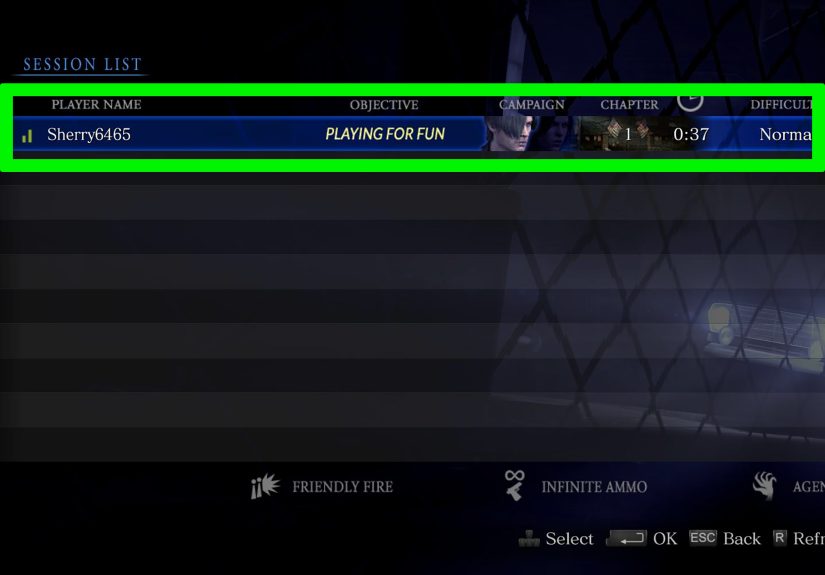
If you do not want to host, you can join another player’s session through the Join Game menu. Quick Match automatically looks for available sessions, while Custom Match gives you more control over campaign, chapter, difficulty, and other settings.
4. Mercenaries Co-Op
The Mercenaries mode also supports co-op. Instead of progressing through the story, you and a partner fight for high scores within a time limit. It is faster, more arcade-like, and great for practicing teamwork without committing to a full campaign chapter.
How to Play Offline Split-Screen Co-Op in Resident Evil 6
Offline co-op is the easiest way to play with someone sitting next to you. Before starting, make sure both controllers are connected and recognized by your system. If you are on a console, it helps if both players are signed into their profiles. If you are on PC, two controllers are usually the smoothest option because keyboard-and-controller combinations can be awkward depending on your setup.
Step-by-Step: Split-Screen Setup
- Launch Resident Evil 6 and go to the main menu.
- Select Play Game.
- Choose Campaign.
- Select New Game, Continue, or Chapter Select.
- Choose the campaign you want to play.
- Select your character and difficulty.
- When you reach the settings screen, find Screen Mode.
- Change Screen Mode from Single to Split.
- Have Player 2 press the prompted start button on their controller.
- Confirm the settings and begin the chapter.
If you are starting from a brand-new save file, you may need to complete the opening prologue before the full campaign menu becomes available. That short intro teaches the basics, but once the main campaign options open up, co-op becomes much easier to access.
Split-screen works in the campaign and in The Mercenaries. It is perfect for casual play, but remember that both players share the same display. If one player wants to examine every corner and the other wants to sprint forward like they are late for a dentist appointment, the screen layout can feel a little cramped. Communication helps. So does patience. So does not blocking ladders.
How to Host Online Co-Op in Resident Evil 6
Hosting online co-op means you create the session and allow another player to join. This is the best option when you want to control the campaign, chapter, difficulty, and whether your session is public or private.
Step-by-Step: Hosting an Online Campaign Session
- Open Resident Evil 6 and choose Play Game.
- Select Campaign.
- Choose New Game, Continue, or Chapter Select.
- Select your campaign, character, and difficulty.
- Go to the System Settings screen.
- Set Network Selection to an online option instead of Offline.
- Set Partner Join to Allow.
- Use private slots or friend-only settings if you want to play with a specific friend.
- Invite your friend through the game lobby or your platform’s friend system.
- Start the game once your partner joins, or begin and let them join in progress if your settings allow it.
The most important setting is Partner Join. If it is set to Don’t Allow, your friend can stare at the invite screen all day and still not get in. That is not horror; that is menu-based tragedy.
If you want story intersection co-op to work, make sure your session settings are open enough for other players to connect during those special moments. Public settings increase the chance of intersection play, while private settings are better when you only want your own friend in the session.
How to Join a Friend’s Online Co-Op Game
Joining a co-op game is just as simple, but you need to match the host’s platform and online environment. Resident Evil 6 does not offer modern cross-platform matchmaking, so a PlayStation player cannot simply join an Xbox player, and a PC player cannot jump into a Switch session. You and your partner need to be playing compatible versions within the same platform ecosystem.
Step-by-Step: Joining a Co-Op Session
- Launch the game and select Play Game.
- Choose Campaign.
- Select Join Game.
- Choose Quick Match if you want the game to find a session automatically.
- Choose Custom Match if you want to search by campaign, chapter, difficulty, or other conditions.
- Accept a direct invite if your friend sends one through the platform’s friend system.
- Confirm your character and wait for the session to load.
If you cannot find your friend’s game, check three things first: both players are online, the host has Partner Join enabled, and the session is not locked behind private settings. Also make sure both games are updated. Nothing ruins the mood faster than one player being ready for zombie drama while the other is trapped in update purgatory.
Best Campaigns for Co-Op Beginners
Resident Evil 6 has several campaigns, and each one feels different in co-op. Choosing the right starting point can make your first session smoother.
Leon and Helena
Leon’s campaign is the closest to a traditional Resident Evil atmosphere. It has slower sections, darker environments, and a more horror-flavored pace early on. This is a good choice if one player is new because the campaign gives you time to learn movement, aiming, healing, and partner actions.
Chris and Piers
Chris’s campaign leans heavily into military action. Expect more shooting, bigger encounters, and faster pacing. It is fun in co-op if both players enjoy aggressive gameplay and do not mind the game occasionally turning into a blockbuster action movie with extra teeth.
Jake and Sherry
Jake and Sherry’s campaign mixes chase sequences, hand-to-hand combat, and more varied pacing. It is a strong co-op option for players who want something different from standard cover shooting. Jake’s combat style can feel especially satisfying once you get used to it.
Ada and Agent
Ada’s campaign was originally designed around her solo story, so co-op feels different here. The second player controls Agent, who functions more like a gameplay partner than a major story character. It can still be fun with a friend, but it is not the best first stop if you want the most natural two-character story experience.
Important Co-Op Settings to Understand
Resident Evil 6 gives you several session settings, and understanding them prevents most co-op headaches.
Network Selection
This decides whether your session is offline or online. For online co-op, do not leave it on Offline. Choose the online network option available on your platform.
Partner Join
This controls whether another player can join your campaign. Set it to Allow if you want a friend or public player to enter your game.
Private Slots
Private slots help reserve space for invited friends. Use this when you do not want a random player joining before your friend can connect.
Agent Hunt Settings
Agent Hunt is not regular campaign co-op. It allows another player to enter someone’s campaign as an enemy creature after the mode is unlocked. If you want a straightforward co-op experience, you can disable Agent Hunt so your session stays focused on you and your partner.
Common Resident Evil 6 Co-Op Problems and Fixes
Problem: Player 2 Cannot Join Split-Screen
Check that the second controller is connected before launching the chapter. On PC, confirm the controller is recognized by your system and the game. Then return to the character or settings screen and make sure Screen Mode is set to Split, not Single.
Problem: Friend Cannot Join Online
Make sure the host is not set to Offline and that Partner Join is enabled. If you are trying to play privately, send a fresh invite. If that fails, both players should restart the game and check for updates.
Problem: You Cannot Find Each Other in Matchmaking
Use Custom Match instead of Quick Match and match the same campaign, chapter, and difficulty. If your friend is already mid-chapter, they may need to reach a point where joining is allowed.
Problem: Online Play Is Not Working on Console
Verify that your online membership is active and that the platform’s network service is working. Also check privacy settings, especially if the account has restrictions on multiplayer or communication.
Co-Op Tips That Make Resident Evil 6 More Fun
The best Resident Evil 6 co-op teams do not just shoot everything and hope the chapter ends before the snacks run out. They communicate, divide roles, and use the game’s partner systems wisely.
Share Resources Like Responsible Adults
Ammo, healing items, and skill points matter. Do not grab everything simply because it sparkles. If your partner is low on supplies, slow down and let them collect what they need. A well-stocked teammate is better than a heroic disaster with no bullets.
Use Partner Commands
The game includes simple partner communication options, including thanks, instructions, and attack commands. These are useful when voice chat is unavailable or when you need to point out a target quickly.
Revive Quickly
When your partner is in trouble, help them fast. Health tablets can be used to revive and restore vitality. In co-op, rescue timing matters more than looking cool. Nobody cares about your dramatic reload animation if your partner is crawling on the floor.
Coordinate Skills
Skill sets let you improve your character’s performance. One player might focus on firearm damage, while another improves defense or item efficiency. You do not need a perfect build, but complementary skills make harder chapters less punishing.
Stay Close, But Not Too Close
Partners should stay near each other, especially during first-time runs. However, standing directly in front of your teammate while they aim is a friendship test nobody asked for. Keep enough spacing to cover angles and avoid blocking movement.
Is Resident Evil 6 Better in Co-Op?
For many players, yes. Resident Evil 6 was clearly designed with co-op in mind. The partner banter, dual-character scenarios, shared action sequences, and large-scale encounters all work better when a real person is beside you. Solo play is possible, but the AI partner cannot laugh at a ridiculous cutscene, warn you about an enemy behind you, or apologize after accidentally running ahead and triggering chaos.
Co-op also makes the game’s wild tone easier to enjoy. Resident Evil 6 is not the slowest or scariest entry in the series. It is more of an action-horror roller coaster with occasional puzzle stops and a lot of dramatic camera angles. Playing with a friend turns that energy into a strength. The game becomes less about perfect horror atmosphere and more about surviving a massive, messy, entertaining adventure together.
Conclusion: The Best Way to Play Co Op in Resident Evil 6
Learning how to play co op in Resident Evil 6 is mostly about choosing the right mode and checking the right settings. For couch co-op, connect two controllers, choose Campaign, set Screen Mode to Split, and have Player 2 join before starting. For online co-op, set Network Selection to an online option, allow Partner Join, invite your friend, or use Join Game to connect to someone else’s session.
The best beginner path is usually Leon’s campaign because it introduces the game’s systems at a more manageable pace. Once both players feel comfortable, Chris, Jake, and Ada’s campaigns offer different flavors of co-op chaos. Mercenaries is also worth trying when you want a quick session focused on score, timing, and teamwork.
From actual gameplay experience, Resident Evil 6 co-op works best when both players accept the game for what it is: big, dramatic, sometimes clunky, often funny, and surprisingly enjoyable when shared. The first few chapters may feel busy because the game throws movement options, melee attacks, quick-turns, dodges, partner actions, and inventory management at you quickly. Give it time. After an hour or two, the rhythm starts to click. One player naturally becomes the cautious looter, the other becomes the “let’s open this suspicious door” person, and together you form a beautiful disaster-response unit.
The biggest lesson is communication. Tell your partner when you are low on health. Call out supplies. Warn them before triggering objectives. Decide who handles long-range threats and who covers close-range enemies. If one player rushes while the other explores, frustration builds fast. But when both players move as a pair, Resident Evil 6 becomes smoother, funnier, and far more memorable.
Split-screen has its quirks, especially with reduced screen space, but it has an old-school charm that online play cannot fully replace. Sitting next to someone while both of you panic through a boss fight is exactly the kind of gaming memory that sticks. Online co-op, meanwhile, is cleaner for visibility and better for players who want their own screen. Both options are valid; the best one depends on your setup and patience level.
One final tip: do not treat Resident Evil 6 like a pure survival horror game where every bullet must be mourned like a lost family heirloom. Be smart with supplies, yes, but use the combat tools the game gives you. Melee attacks, dodges, counters, and partner revives are part of the design. The more you cooperate, the more the game opens up. And if everything goes wrong? Laugh, reload the checkpoint, and blame the camera like generations of players before you.