Table of Contents >> Show >> Hide
- First, Make Sure You’re Citing the Right “Type” of Chapter
- The Standard APA Format for a Chapter in an Edited Book
- How to Cite a Book Chapter in APA: 10 Steps
- Step 1: Confirm whether you should cite the chapter or the whole book
- Step 2: Write down the chapter author(s) exactly as shown
- Step 3: Capture the publication year of the book
- Step 4: Add the chapter title in sentence case
- Step 5: Insert the editors using the “In … (Eds.),” structure
- Step 6: Add the book title in italics (sentence case)
- Step 7: Include edition and/or volume when it applies
- Step 8: Add the chapter page range with “pp.”
- Step 9: Finish with the publisher name
- Step 10: Add a DOI (or URL only when appropriate)
- In-Text Citations for Book Chapters
- Common Mistakes (and the Fix in Plain English)
- Examples You Can Copy (and Then Customize)
- FAQ: Fast Answers to the Questions Everyone Googles at 1:00 a.m.
- Conclusion
Generated with GPT-5.2 Thinking
Citing a book chapter in APA can feel like assembling IKEA furniture without the tiny Allen wrench. You’ve got names, years,
editors, page ranges, and maybe a DOI lurking in the shadows like a plot twist.
The good news: once you understand what kind of chapter you’re citing, APA becomes a repeatable recipenot a mystery novel.
This guide walks you through the exact pieces APA (7th edition) expects for a book chapter citation, shows you how to format
both the reference list entry and the in-text citation, and includes practical examples so you can stop guessing and start submitting.
First, Make Sure You’re Citing the Right “Type” of Chapter
Before you format anything, answer one question:
Is this chapter written by a different author than the book’s main author(s)and the book is edited/compiled?
If yes, you’re usually citing a chapter in an edited book.
If the book is an authored book (same author(s) throughout) and you just used one chapter,
APA generally has you cite the whole book in the reference list, not an individual chapter.
(You can still point to the chapter or page range in the in-text citation when helpful.)
The Standard APA Format for a Chapter in an Edited Book
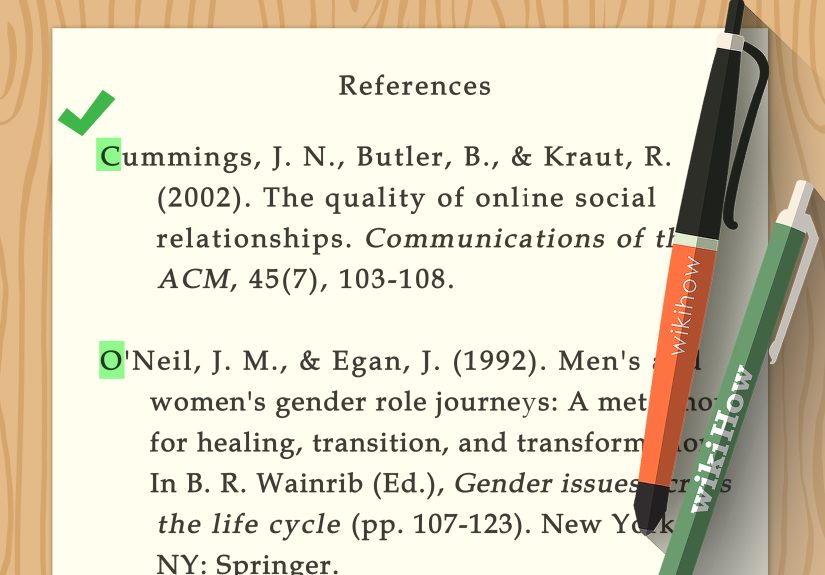
For a typical chapter in an edited book, your reference list entry is built like this:
Chapter Author, A. A. (Year). Title of chapter in sentence case.
In E. E. Editor & F. F. Editor (Eds.), Title of book in sentence case (pp. xx–xx).
Publisher. DOI (if available)
Quick formatting rules that matter more than people think
- Chapter title: sentence case, not italicized.
- Book title: italicized, sentence case.
- Editors: initials first, last name second; use (Ed.) or (Eds.).
- Page range: use pp. and an en dash for ranges (e.g., pp. 34–52).
- Publisher location: not used in APA 7.
- DOI: include if the chapter/book has one (formatted like a URL in APA 7).
How to Cite a Book Chapter in APA: 10 Steps
Step 1: Confirm whether you should cite the chapter or the whole book
Start by checking the book’s structure. If each chapter has its own author and the book has editors, you’re likely citing a
chapter in an edited book. If one author (or the same set of authors) wrote the whole book, APA usually prefers citing the
entire book in your reference list.
Step 2: Write down the chapter author(s) exactly as shown
In your reference entry, the chapter author goes firstnot the editor.
Use last name followed by initials (e.g., Nguyen, T. H.). Keep the author order the same as the chapter shows.
If there are multiple chapter authors, separate names with commas and use an ampersand before the last one:
Nguyen, T. H., Rivera, J. P., & Patel, S.
Step 3: Capture the publication year of the book
For edited book chapters, the year in the citation is the year the book was published.
You’ll place it in parentheses right after the chapter author(s): (2023).
Step 4: Add the chapter title in sentence case
Use sentence case: capitalize the first word of the title, the first word after a colon, and proper nouns only.
Do not italicize the chapter title. End it with a period.
Example: Designing habits that stick: Why tiny wins matter.
Step 5: Insert the editors using the “In … (Eds.),” structure
After the chapter title, add In and list the editor(s) of the entire book. Format editor names like authors:
initials first, then last name.
- One editor: In R. K. Lewis (Ed.),
- Two editors: In R. K. Lewis & M. J. Chen (Eds.),
- Three+ editors: list them all, commas between, ampersand before the last, then (Eds.)
Step 6: Add the book title in italics (sentence case)
The book title is the “container,” so it gets italics. Keep it in sentence case, and include a subtitle if present.
Example: Motivation science for real life: Research that actually helps
Step 7: Include edition and/or volume when it applies
If the book is a specific edition (2nd ed., 3rd ed.) or has a volume number, include it in parentheses after the book title.
If you have both edition and page range, they can appear in the same parentheses separated by a comma.
Example: Title of book (2nd ed., pp. 88–104)
Step 8: Add the chapter page range with “pp.”
In APA, chapter page numbers in an edited book go in parentheses after the book title (and edition/volume if listed).
Use pp. and an en dash:
(pp. 144–163)
Step 9: Finish with the publisher name
After the parentheses, add the publisher. In APA 7, you do not include the city/state.
Keep it clean: Beacon Press.
Step 10: Add a DOI (or URL only when appropriate)
If a DOI exists, include it at the end. If there’s no DOI and you accessed the chapter through a typical academic database,
APA guidance commonly says to omit the database name and URL because the content is widely available elsewhere.
If the chapter is publicly available online (not behind a login) and has no DOI, you may include the URL.
In-Text Citations for Book Chapters
In APA, your in-text citation for a chapter uses the chapter author and the year
(the same year you used in the reference list entry).
Paraphrase
- Parenthetical: (Nguyen, 2023)
- Narrative: Nguyen (2023) argues that…
Direct quote
For quotes, add a page number (or page range). Use p. for one page and pp. for multiple pages.
- Parenthetical: (Nguyen, 2023, p. 41)
- Multiple pages: (Nguyen, 2023, pp. 41–42)
Three or more authors
For in-text citations with three or more authors, APA uses the first author’s last name followed by et al. and the year.
Example: (Rivera et al., 2023)
Common Mistakes (and the Fix in Plain English)
-
Mistake: Citing the editor in-text instead of the chapter author.
Fix: In-text citations point to the chapter author because that’s whose words you used. -
Mistake: Italicizing the chapter title.
Fix: Italics are for the whole book title, not the chapter. -
Mistake: Writing the chapter title in Title Case (Like This).
Fix: Use sentence case for chapter titles. -
Mistake: Adding a database link that won’t work for your reader.
Fix: For most academic databases, omit the URL if there’s no DOI. -
Mistake: Forgetting “pp.” in the page range.
Fix: Chapter pages in edited books use (pp. xx–xx).
Examples You Can Copy (and Then Customize)
Example 1: Chapter in an edited book (print or database; no DOI)
Reference list:
Carter, J. L. (2021). Building resilience in high-pressure environments. In R. K. Lewis & M. J. Chen (Eds.),
Performance psychology in practice (pp. 77–95). Meridian Press.
In-text (paraphrase): (Carter, 2021)
In-text (quote): (Carter, 2021, p. 83)
Example 2: Chapter in an edited book with a DOI
Reference list:
Alvarez, P. M., & Stone, D. R. (2023). Sleep and memory consolidation across the lifespan. In T. J. Harmon (Ed.),
Handbook of cognitive health (pp. 201–224). Northlake Academic. https://doi.org/10.xxxx/xxxxx
In-text: (Alvarez & Stone, 2023)
Example 3: Citing an authored book when you used only one chapter
If the book has one author (or the same authors throughout), cite the book in the reference list:
Reference list:
Parker, S. J. (2020). Learning science made simple. Ridgeview Publishing.
Then, in the text, you can point your reader to the specific part you used:
(Parker, 2020, Chapter 4) or (Parker, 2020, pp. 88–94) depending on what your instructor prefers and what best helps the reader.
FAQ: Fast Answers to the Questions Everyone Googles at 1:00 a.m.
Do I include the chapter number in an APA reference?
Usually, no. APA’s standard format for edited book chapters relies on the page range, not the chapter number.
Chapter numbers sometimes show up in in-text citations as a locator (especially when page numbers aren’t stable),
but they’re not a default part of the reference entry for edited book chapters.
What if there are no page numbers?
Some ebooks or online reference works don’t provide stable page numbers. In that case, use another locator in-text
(like a section heading, paragraph number, or chapter number). For the reference entry, follow the best available
information for that source type and include a DOI/URL if appropriate.
Do I need “retrieved from” or an access date?
For most books and book chapters, no. Access dates are typically reserved for sources designed to change over time
(like certain webpages). A stable book chapter citation usually doesn’t need a retrieval date.
Conclusion
Citing a book chapter in APA isn’t hard because it’s complicatedit’s hard because it’s picky. But once you treat the chapter
as a “piece inside a bigger container,” the logic clicks. Chapter author and year tell your reader who said it and when.
Editors and book title explain where it lives. Page range and DOI/URL make it findable. That’s the whole game.
Experience Notes: What This Looks Like in Real Life (500-ish Words)
In real classrooms, offices, and late-night writing sessions, APA chapter citations usually go wrong in a few predictable ways.
The first is what many students call “the editor trap.” Someone opens an edited volume, sees a famous editor’s name on the cover,
and assumes that person is the author of everything inside. Then the in-text citation becomes (Lewis, 2021) even though Lewis
only edited the book and never wrote the chapter being quoted. The fix is simple: if you’re using the words and ideas from
a specific chapter, the chapter’s author is your in-text citation hero. Editors matter in the reference list because they help
identify the container, but they’re not automatically the voice you’re quoting.
The second common issue is “format drift.” A citation starts out correct, then slowly mutates as it gets copied and pasted
across drafts. A period disappears. “pp.” vanishes. A page range becomes “144-163” with a hyphen. The book title stops being
italicized. None of these mistakes feel dramatic, but they add upespecially if your instructor, editor, or grading rubric
checks APA accuracy. A surprisingly effective habit is keeping one clean “gold copy” of the citation in a notes file and
pasting from that master each time. It sounds overly careful until you’ve spent 20 minutes hunting down why half your
reference list looks like APA and the other half looks like it joined a different citation style in a witness protection program.
Another real-world moment: ebooks. People often assume “online” means “paste the link.” But academic database URLs are frequently
session-based (meaning they expire) or require institutional access (meaning your reader hits a login wall). That’s why APA
guidance commonly tells writers to omit database information for widely available works and lean on DOIs when possible.
When there’s no DOI, the “do I include a URL?” question becomes less about what you can copy and more about what your reader
can realistically open.
And then there’s the “chapter vs. book” confusion, which shows up a lot in book-length nonfiction and textbooks. Many writers
instinctively want to cite the exact chapter title in the reference list because it feels precise. But if the whole book is
authored by the same person (or team), APA usually prefers citing the book as a whole and using page numbers or chapter locators
in the text when you want to guide the reader. Think of it as keeping the reference list tidy while still being helpful in your
in-text citations.
Finally, a practical tip that real people actually use: build the citation in layers. Start with author and year. Add the chapter title.
Add the “In” plus editors. Add the book title. Add page range. Add publisher. Add DOI/URL if needed. By stacking the parts in the same
order every time, you stop “writing a citation” and start “following a checklist.” And that’s when APA stops feeling like a trap and
starts feeling like a tool.