Table of Contents >> Show >> Hide
- Why Build a Sky Island in Minecraft?
- Step 1: Choose Your Sky Island Theme First
- Step 2: Pick the Right Location and Scale
- Step 3: Gather Materials Before You Head Up
- Step 4: Build a Temporary Access Route
- Step 5: Sketch the Island’s Bottom Silhouette
- Step 6: Fill the Core and Add Rock Texture
- Step 7: Shape the Top Surface for a Real Base
- Step 8: Add Grass, Trees, Water, and Hanging Details
- Step 9: Build a Structure with Depth, Not a Box
- Step 10: Plan Movement, Lighting, and Survival Utility
- Step 11: Finish with Polish, Contrast, and Story
- Common Mistakes to Avoid
- Builder’s Notebook: What a Sky Island Teaches You About Minecraft
- Final Thoughts
There are regular Minecraft builds, and then there are sky island builds: the kind that make people stop flying for a second, hover awkwardly, and think, “Well, now I have to rebuild my whole base.” A great sky island feels magical because it mixes two things that Minecraft does ridiculously well: bold shapes and cozy details. It is part landscape project, part survival engineering, and part “I regret choosing this many leaves” marathon.
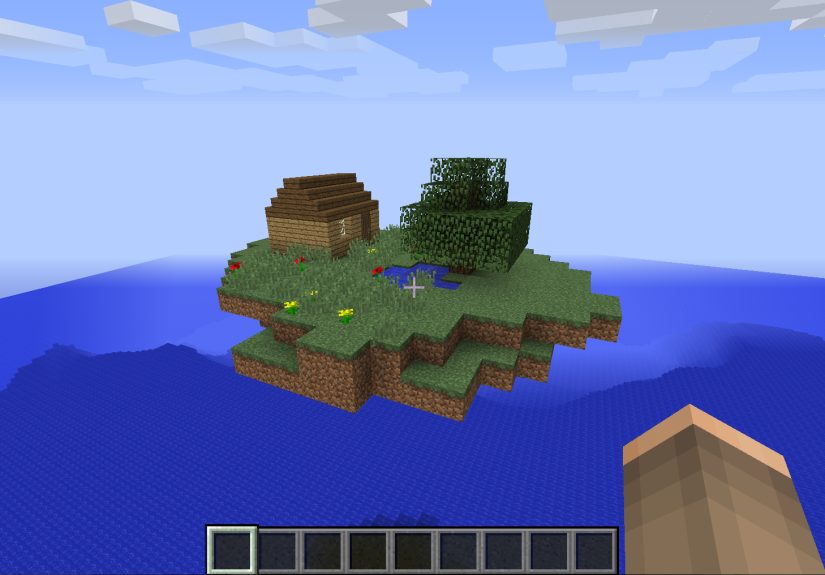
If you want to build a floating island that looks intentional instead of like a chunk of dirt escaped gravity, this guide walks you through the full process. These steps work whether you are building a tiny starter island, a fantasy village in the clouds, or a massive survival base with bridges, farms, waterfalls, and dramatic “I definitely planned this” scenery. The goal is simple: build a sky island in Minecraft that looks natural, plays well in survival, and gives you enough style points to feel slightly smug.
Below, you will find 11 clear steps, practical design tips, block ideas, and real-world building advice for shaping terrain, adding texture, planning access, and decorating your island without turning it into a floating potato. Let’s get airborne.
Why Build a Sky Island in Minecraft?
A Minecraft sky island is one of the best projects for players who want a build that feels both creative and cinematic. It gives you elevation, better views, great screenshots, and a natural sense of drama. It also forces you to think about shape, structure, and movement in a way a flat-ground base never does. You are not just building a house. You are building the land itself.
That is what makes floating island builds so satisfying. The underside matters. The silhouette matters. The way the island connects to bridges, waterfalls, trees, lanterns, and stairways matters. Every angle counts, which is why a little planning goes a long way.
Step 1: Choose Your Sky Island Theme First
Before you place a single block, decide what kind of floating island you want. This sounds obvious, but skipping this step is how people end up with a cherry blossom cottage sitting on top of a jagged volcanic rock and pretending that was the vision all along.
Popular sky island themes
A classic meadow island uses stone, dirt, grass, oak logs, moss, and lanterns. A fantasy island might lean into deepslate, tuff, glowing details, waterfalls, and hanging roots. A heavenly build can use quartz, smooth stone, white concrete, and pale vegetation. If you want something dramatic, build a ruined temple, wizard tower, or suspended village above the clouds.
Your theme affects everything: the island shape, the block palette, the kind of trees you use, and the structure you place on top. Pick one early and the rest of the build becomes much easier.
Step 2: Pick the Right Location and Scale
Now choose where the island will float. If you are in Creative mode, you can place it anywhere that looks good in the skyline. In Survival, think more practically. You want enough room to build safely, enough vertical space to make the island feel airborne, and enough distance from nearby terrain so it actually looks like it belongs in the sky.
Scale matters, too. A beginner-friendly sky island might be 21 to 31 blocks wide. That gives you enough space for a tree, a small house, and some decoration without requiring your entire weekend and most of your emotional stability. Larger islands look epic, but they also demand more support blocks, more shaping, and much more texturing.
If you are starting a fresh world, it can help to choose a seed that already has dramatic terrain, cliffs, lakes, or mountain ranges nearby. That surrounding scenery makes your floating island feel even more impressive once it is finished.
Step 3: Gather Materials Before You Head Up
Nothing kills building momentum like climbing halfway into the clouds and realizing you forgot slabs, torches, and literally all your dirt. Gather more than you think you need.
Good starter materials for a sky island
- Stone, cobblestone, and andesite for the rocky underside
- Dirt and grass blocks for the top surface
- Moss blocks, moss carpet, and azalea for soft landscaping
- Logs, planks, fences, trapdoors, and stairs for structures
- Leaves, vines, lanterns, and chains for detail
- Scaffolding, ladders, or temporary blocks for access
- Water buckets for waterfalls and safe descents
Keep your palette tight. Three to five core blocks often look better than twelve “interesting” choices battling for attention like a group project gone wrong.
Step 4: Build a Temporary Access Route
Before you shape the island, create a safe way to reach the build area. In Survival mode, this is non-negotiable unless your plan is “fall repeatedly and learn nothing.” A dirt pillar works, but scaffolding is much cleaner because it is fast to place, easy to remove, and much easier to use while adjusting terrain.
You can also use a water elevator, a spiral staircase, or a temporary platform suspended nearby. Later in the game, elytra make sky island building dramatically easier, but even then, a proper work route saves time when you are carrying stacks of blocks and changing your build from every angle.
Step 5: Sketch the Island’s Bottom Silhouette
This is the step that separates a believable floating island from a flat lawn with commitment issues. Start from the bottom and work upward. Place a small core shape first, then slowly widen it as you build toward the top. Think of the underside like an upside-down hill or hanging cliff.
A good sky island usually has an irregular shape. Avoid making the bottom perfectly symmetrical unless you are intentionally going for an artificial or magical design. Natural-looking islands taper, bulge, crack, and shift. From a distance, the outline should feel organic.
One smart trick is to avoid overly long straight lines. Break edges with stairs, slabs, walls, and uneven clusters of stone. Add subtle overhangs. Pull some areas outward and pinch others inward. That variation makes the island feel carved by nature instead of dropped from a block printer.
Step 6: Fill the Core and Add Rock Texture
Once the silhouette looks right, fill the island’s core. Do not leave everything hollow unless you enjoy hearing mobs surprise you from the inside later. Fill most of the mass with cheap blocks, then skin the outside using your main stone palette.
This is where texture matters. If the underside is all one block, it will look flat and artificial. Blend stone with cobblestone, andesite, tuff, or deepslate depending on your theme. Use stairs and slabs to soften chunky edges. Add the occasional hanging section or mini ledge to create depth.
For a lush island, tuck moss and mossy stone into small pockets. For a fantasy island, let roots, vines, or glow berries hang from the underside. For a colder build, use smoother stone and fewer soft details. Your underside is not background scenery. It is half the build.
Step 7: Shape the Top Surface for a Real Base
Now build the top layer. Add dirt over the stone core and shape the ground with slight rises and dips. A perfectly flat top is functional, sure, but it rarely looks amazing. Even one-block elevation changes can make a sky island feel more natural and more interesting to walk through.
Think in zones. Leave a flatter area for a house, tower, or central tree. Raise a small ridge at one edge for visual interest. Carve out space for a pond, path, or garden. If you want a survival-friendly base, plan where farms, storage, and crafting areas will fit before the landscaping gets too fancy.
This is also a great time to decide whether your island will be one single landmass or part of a floating archipelago. Multiple smaller islands connected by bridges can look incredible and make the build feel larger without requiring one giant circular platform.
Step 8: Add Grass, Trees, Water, and Hanging Details
Here comes the fun part: turning a solid chunk of floating geology into an actual place. Cover the top with grass, then start landscaping. Add custom trees, bushes, flowers, lantern posts, and paths. Use moss and bonemeal carefully to create a softer, more overgrown look. Hanging vines, roots, and waterfalls help sell the idea that this island has been suspended in the sky for ages, not assembled five minutes ago between snack breaks.
Easy ways to make a sky island look better
- Use at least two leaf types for richer trees
- Mix short and tall plants to avoid a flat lawn effect
- Add one waterfall instead of five; restraint is beautiful
- Let some vegetation spill over edges for movement
- Use cherry leaves, azalea, or dark oak leaves to change the mood
Do not overdecorate every corner. A few well-placed details look intentional. Random clutter looks like your inventory exploded.
Step 9: Build a Structure with Depth, Not a Box
Your island deserves more than a cube with a door. Whether you are building a cottage, a temple, a tower, or a survival house, make sure the structure has depth. Push walls in and out. Add roof overhangs. Use stairs, slabs, fences, and trapdoors to create dimension. Recess windows instead of placing them flat. Even a small build feels richer when it has layers.
A sky island structure should also match the land beneath it. A bulky stone fortress works well on a large, jagged island. A small oak house fits a softer meadow island. A tall tower can make the island feel grander because it exaggerates the vertical scale.
If you want the safest route, build one focal structure and let the terrain support it. Too many competing buildings on one island can make the whole thing feel crowded.
Step 10: Plan Movement, Lighting, and Survival Utility
Beautiful builds are great. Beautiful builds you can actually live in are better. Add pathways, stairs, ladders, trapdoors, or bridges so movement feels natural. If the island is high enough, think about safe entry and exit. Water drops are simple. Elytra launches are stylish. Dramatic cliffside staircases are for players who enjoy danger and very specific cardio.
Lighting matters more in the sky than many players expect. A dim island quickly becomes a mob apartment complex. Hide lanterns under leaves, place light sources along paths, use interior lighting in your build, and check darker corners under overhangs.
For a functional survival sky base, include the basics: bed, storage, furnaces, crafting, food supply, and at least one safe farming area. If you are making a long-term base, consider a tree farm, small crop plot, or animal nook on a connected mini-island.
Step 11: Finish with Polish, Contrast, and Story
The final step is where your sky island becomes memorable. Walk around the build from far away and close up. Ask yourself three questions: Does the silhouette look interesting? Does the top feel alive? Does the island tell a story?
Maybe it is an abandoned ruin wrapped in vines. Maybe it is a peaceful cottage island with a tiny dock and waterfall. Maybe it is a wizard’s retreat with a glowing tower and suspended bridges. Story gives the build personality. And personality is the difference between “nice project” and “please send me that world download immediately.”
Add final contrast with accent blocks, tiny custom details, and a little asymmetry. Then remove your temporary scaffolding or dirt pillars so the illusion is complete. Nothing says “ancient floating wonder” like a random cobblestone ladder to nowhere.
Common Mistakes to Avoid
The biggest mistake is making the underside too flat. The second biggest is making the top too crowded. Another common issue is ignoring access, which is hilarious right up until you fall off with all your building materials. Players also tend to overuse one block, overbuild tiny details, or forget to light the island well enough for survival.
If your island looks awkward, step back and fix the big shapes first. Scale, silhouette, and depth matter more than decorative flourishes. Fancy leaves cannot save bad geometry. They can try, bless them, but they cannot.
Builder’s Notebook: What a Sky Island Teaches You About Minecraft
Building a sky island in Minecraft does something sneaky: it makes you better at almost every other kind of building. At first, the project feels like a cool aesthetic challenge. You want the floating island because it looks cinematic, dramatic, and just a little smug in the best possible way. But once you start, you realize the island is teaching you how to think like a builder instead of just a placer of blocks.
The first lesson is patience. On flat ground, you can hide mediocre planning with more walls, more roofs, and a few decorative bushes. In the sky, every angle is visible. You cannot fake a strong silhouette when the whole build is hanging in open air. That forces you to slow down, look at the outline, and make intentional decisions. You begin to understand why shape matters so much.
The second lesson is restraint. Many players, especially when they are excited, throw every “pretty” block onto one build. Lanterns, moss, waterfalls, chains, glow berries, leaves, trapdoors, banners, fences, flowers, and maybe a goat if the mood is right. A sky island punishes that impulse. Too much detail makes the build unreadable. Suddenly, you learn that one waterfall is more dramatic than four, one custom tree is stronger than a forest of identical blobs, and a clean path often looks better than cluttered terrain.
The third lesson is movement. A floating island is not just something to stare at. It is something to move through. The best sky islands feel satisfying to enter, cross, and explore. Maybe you climb a narrow stair around the rock, cross a rope bridge to a farm island, and then step into a lantern-lit cottage at the top. That journey matters. It makes the build feel lived in. It makes the space memorable.
There is also a weirdly emotional side to it. A good sky island feels personal. Maybe that sounds dramatic for a game made of cubes, but it is true. Because the island is isolated, every choice feels deliberate. Every tree, path, window, and ledge tells the player something about the builder. Cozy players make cozy islands. Chaos goblins make floating fortresses with suspicious redstone. Fantasy fans build shrines in the clouds. Survival experts turn tiny islands into brilliant, efficient bases.
And then there is the reward at the end: the moment you remove the scaffolding, fly back, and finally see the build without all the temporary junk around it. That is the magic moment. The floating island stops feeling like a project and starts feeling like part of the world. It looks impossible in exactly the right way. It looks like something Minecraft should have generated, but somehow a little better.
That is why sky islands are worth building. They are not just pretty. They sharpen your design sense, improve your terrain work, teach you balance, and make you think about storytelling in a new way. Plus, let’s be honest, they look outrageously cool. And sometimes that is reason enough.
Final Thoughts
If you want to know how to build a sky island in Minecraft, the secret is not one magic block palette or one perfect tutorial. It is a combination of strong shapes, smart texturing, practical access, and thoughtful decoration. Start with the theme, shape the underside carefully, build the top with purpose, and then layer in details that support the whole design instead of distracting from it.
Whether you are creating a small floating survival base or a massive fantasy island city, these 11 steps give you a framework that works. Build slow, check the silhouette often, and remember: if it looks weird, add less before you add more. The clouds are forgiving. Your screenshots are not.